Tuesday, 2 January 2007

Mathematics with Java Doubles

Sun's Java LogoToday, I was trying to revise Java before the term starts. While in the process, I hit a simple addition problem:

System.out.print(124.4 + 18.2); //Outputs 142.6 System.out.print(124.6 + 18.2); //Should output 142.8, right? No... //... // //it outputs 142.7999999999999!

Weird no? After a bit of googling, I found out that this was due to the Java Language Specification, with doubles being converted to strings. (I don't understand the reasoning either)

The solution is to use the BigDecimal class. Wrap each of the double values in a BigDecimal class and invoke the add method in it.

Well, that didn't work properly. In fact, it got worse:

BigDecimal num1 = new BigDecimal(124.6); BigDecimal num2 = new BigDecimal(18.2); System.out.print(num1.add(num2)); //Outputs 142.7999999999999936051153781590983271598815917968

The problem is still there!

Turns out that the solution was very simple:

BigDecimal num1 = new BigDecimal("124.6"); BigDecimal num2 = new BigDecimal("18.2"); System.out.print(num1.add(num2)); //Outputs 142.8 - FINALLY!!

So ladies and gentlemen, remember to use the BigDecimal for your decimal calculations AND to pass the value as a String! Or you will see funny long numbers appearing mysteriously!

It's back to school next week! Looking forward to meeting new faces!
Thursday, 28 December 2006

How CORS Loves to Irritate Me

The holidays are almost over! I've just checked the Exam Results site for my New Year present from NUS. Well, I can say it has been a bad start.

As usual I plough through the summary of degree requirements, Timetable Builder and Module Information (computing modules mirror).

So now, back to meeting Mr. CORS. Been a long time since I saw you ol' buddy. The last time I saw you was during tutorial registration. And I see you have been up to some extra irritating things again.

  1. The Dreaded Login Screen

  2. The Dreaded Login Screen

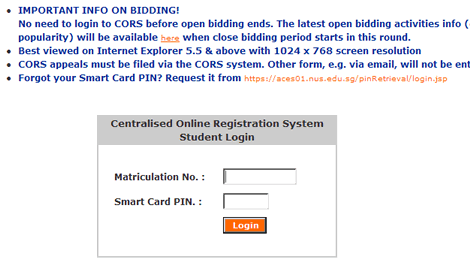
    I meet the login screen again. Doesn't support IE's AutoComplete. Doesn't support "Remember Me". Did I mention that this screen forced me to open it in a new window?

  3. Having to confirm my address *everytime* I login

  4. The Dreaded 2nd Login Screen

    Seriously, I've checked the address 1,384,493,943 times and it is correct. I will inform the Admin Registar if Osama decides to kidnap me. You have my word, Mr. CORS.

  5. Not Allowing Me to view any Module Information (Irritation of the Year Award ?????)

    Irritation of the Year Award

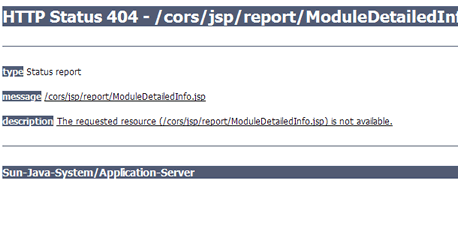
    From http://www.cors.nus.edu.sg/CorsSchedule/moduleInfo.html, I click on Faculty Modules, and get presented with the above screen. Is this really needed during the bidding period? And it has been happening for 2 days.

    Luckily, there's the SOC Course List for SOC modules. Clicking the course code shows the pre-requisites and other info.

    For SS and UE's outside faculty, I have to LL and ask around.

Happy Bidding, fellow colleagues. Just don't compete with me :-)

Tuesday, 14 November 2006

My First Experience With Linux

I am a SOC Student. And let's face it - being SOC means making friends with less user friendly operating systems, that's Linux.


My First Linux OS

So, I went ahead and downloaded Xubuntu, supposed to be the easiest to install and use.

Bittorrent download went smooth maxing at 250KB/s. Burned the CD-RW and booted my laptop from it.

Waited for a few minutes for the Live CD to boot up, and then started by clicking on the Install button.

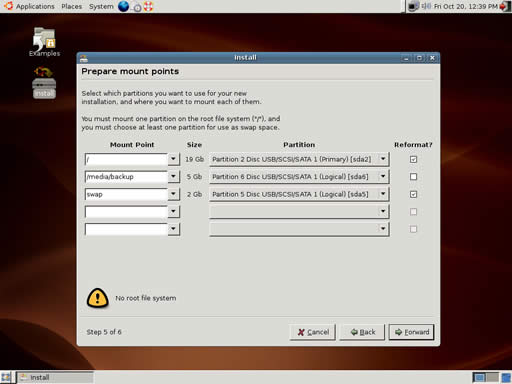
All went well, till I came to an error screen. "No root file system found"


The first Linux Bug i encountered, right on the Installation screen! And it doesn't allow you to go pass it!
(Screenshot copied from somewhere - hey, at least I'm being honest!)


And its a known issue! Gee, a bug in the install process that does not allow you to install.

Lucky, there's a workaround posted in the Ubuntu froums thanks to rsambuca:

You can also quickly get around the "no root file system" error by changing the validation.py file.

When running the liveCD, but prior to installation:


Code:
sudo gedit /usr/lib/ubiquity/ubiquity/validation.py
go to the end of the file, and edit the line that says


Code:
if not root:

result.add(MOUNTPOINT_NOROOT)
Change to:


Code:
if not root:

pass
Make sure you leave the indentation in before the word "pass". Save the file, close it, and then you can run the installer.

Now, when you run the installer, it won't check for a "/" directory, so make sure you have one!

Unfortunately, it doesn't work in Xubuntu or Kubuntu, probably because gedit isn't included. Too lazy to source for another text editor, so I went and downloaded another Ubuntu version - Kubuntu.


My next OS - Kubuntu

After downloading and burning the CD, I found that Kubuntu also doesn't have gedit.

In the end, I ended up installing Ubuntu Edgy Eft with the above workaround.


And finally, Ubuntu

The bug only appears if you try to install using the advanced partitioner, when you are dual booting. How they released this expecting users to fully install it as the only OS is beyond me.

Next, Firefox. I need to view videos on YouTube and access IVLE - its my life! (j/k)


Firefox! The fierce competitor to Internet Explorer (but its a mega memory sucker. In Windows, that is)

Thankfully, Ubuntu comes bundled with it. I start browsing to YouTube. Clicked on a video. Hm, a plugin is needled! Easy!

Downloaded the Adobe Flash Player. Restart Firefox. Back to YouTube. Guess what? Firefox just disappeared.

Try again. Firefox tells me it did not close properly. Went to view another flash website. Same thing.

Back to Windows XP for now. And studying for exams.