|
|
Besides the regular CORS and IVLE alerts that I look forward to receiving in my mail, most of the mails in the account are advertising (read: spam) forwarded and sent by NUS members. It is quickly reaching to a level where many minor events are sent in e-mails to the whole NUS even though it affects only a small percentage of the recipients. For example: Sports facility closures, various student competitions held by external organisations, any NUS event that needs people to fill up the space, job postings no matter how small, sports trials... ![You are expected to check your e-mail regularly [ source ]](https://blogger.googleusercontent.com/img/b/R29vZ2xl/AVvXsEj-zXjeFTMZuXWhvzi8K_Gg-bg5P57-K52IF55J8woi9ps-vcLgWYtFjyl1QiGfVFhuASDhI8X_PZTcWfWSp8-D3SnhjtnwcJLgdOlhyphenhyphenvouaBkRf8sSFzr1vpXQvN1tNEhPQV4AnA/s400/outlook.jpg)
You are expected to check your e-mail regularly [ source ]
And the list goes on .. SOC Technical Services sends 'Patches' alerts everytime there's a Windows or Office patch released. Never mind that Automatic Update takes care of this already. Then there's Estate & Development News sending restaurant closure / opening alerts. Then there's What'z Newz @ OSA with 90% useless news (e.g. Free Entry to NHB Museums, NUS Volunteering Network recruitment) and useful news (such as the Transitlink Card Replacement) so you can't block them... the list can go on. 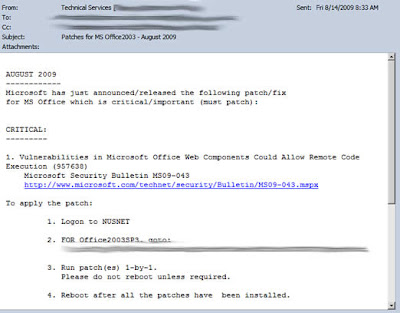
Weekly Patches E-Mail.. when Automatic Updates already does it... No way to unsubscribe..
Such news should be posted on their own web pages and not e-mailed out to all the students in NUS. Perhaps because NUS mail is so easy, just compose and send. Updating the webpages may require more steps due to the publicness of the web pages. Most of their mails don't take up much space but they do take up my time as I have to skim through each of them and delete them. And those big emails.. those more than 100KB.. taking up valuable email space... those are the most problematic ones. Here's a peek at some of the spam I have received. If you are a company, you now know who to contact to spam the 100% guaranteed verified NUS student mailing list. - Toshiba laptops offer sent by NUSSU Bizcom Nustyle (with a 830KB image attachment)
Two mails, each 1MB, was sent with a big image as a attachment.

ATTENTION! Toshiba laptops offers! And it advertises only for Toshiba laptops. Lenovo, Apple and other NUS tenders were not given this excellent marketing opportunity to reach NUS students.
How did Toshiba managed to convince NUStyle to send the advertising?
- Annual Kaspersky Lab IT Security Student Conference from SOC (sent 3 times by 3 different senders)
A job position hiding behind a security competition event...

Annual Kaspersky Lab IT Security Student Conference
And the mail was sent 3 times to all SOC students, with two mails being 500KB. Props to NUS Students' Computing Club for not sending the attachment. They were also the first one to send this out, while the other two just forwarded the mails to all SOC students without checking.
- AIA Campus Photo Contest 2009 sent by NUSSU Bizcom
Learn a new marketing strategy today:
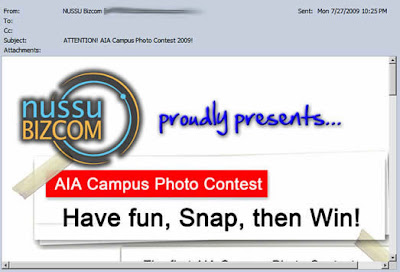
AIA Campus Photo Contest 2009
Just hold a contest, even a simple one like a photo contest, and you instantly get an opportunity to advertise your company to NUS students. And save on the fees for hiring a design firm.
- Ubisoft Singapore Facebook Page sent by SOC
This may be of interest to the Communication and Design majors, but to ALL SOC students??
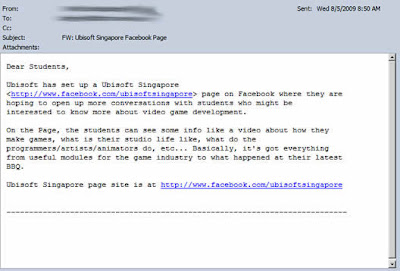
FW: Ubisoft Singapore Facebook Page
- Events Totally Not Related To Some Students
Such as this launch of CLing, a *totally* mandarin event, sent to all students. A 1MB email.
Instead of sending to only Chinese students, the email is sent to the whole school.

FW: Business China - An Invitation to the Launch of...
Thank you for wasting 10 minutes of my time reading through the whole email only to find out that it is conducted in a language I don't know.
- CCA Advertisements (743KB email)
So you are running out of members in your CCA and have a strong connection with What's Newz @ OSA...

NUS English and Chinese Debaters Recruitment Drive
IF I wanted to sign up for the CCA, I would have done so during the Matriculation Fair.
Imagine if all the CCAs send emails to recruit more members...
- Swensen's (500KB email)
Another event not completely related to NUS.
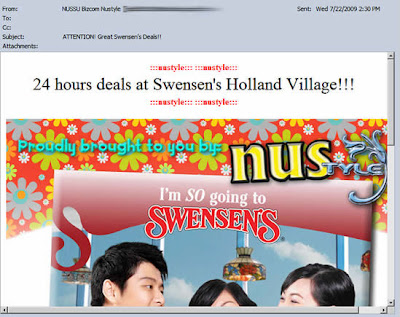
ATTENTION! Great Swensen's Deals!
There is a unsubscribe notice at the bottom, but I wonder whether it really does work (the email ends with edu.sg.com).
- Plus many mails from NUS Career Centre
In July 2009, they sent 5 mails. In May 2009, 14 mails.

eNewsletters you can't unsubscribe from..
- And Career Notices From Other Unknown Sources
Even SOC Unix e-mail accounts have spam.

part-time marketing research job available
This mail was sent to my SOC UNIX e-mail account. I wonder how they got hold of my UNIX e-mail account which I never used in the first place.. Hmmm?
See my previous post and this post for more past e-mail rants.
My humble request to all NUS email senders, please use NUS groups. This way, we can opt out and in various mailing lists. Except CORS and IVLE. The worrying thing is that some senders send important information as well as useless information using the same e-mail alias (e.g. 'What'z Newz @ OSA' and the SOC staff). That is why it is so dangerous to automatically direct them to the Junk folder based on the sender's e-mail address. Strangely enough, events that deserves to be e-mailed don't get e-mailed. For example, when the CORS rounds start, an e-mail should be sent one day beforehand to remind all students to bid. And when a tutorial balloting round starts, another e-mail should be sent if the student is eligible to rank in the first round. Similarly, when the closed bidding period is starting and I have been either outbid or the module has higher demand than vacancy, a warning e-mail should be sent too. This is what e-mail should be used for... but... (gritting teeth)... must.. tolerate... one... more... semester...
It's been said that things that are too good to be true, are usually are. NUS Large Mail is a fine example of that. 
What it actually means. Source
When you go to the fine print of this upgrade here, it becomes clear. What is thought to be a simple 1GB upgrade of all mailboxes is actually a complicated addition of a secondary 'vault'. Something like the Closed Bidding period in CORS - where things can be quite random. Actually, it works to a extent. But only if the rate of incoming mail does not exceed the rate it archives the mail. Sure, it auto archives my mail for me every month. But if I happen to receive lots of large files in 2 consecutive days, I still have to login to clear my inbox as the archival kicks in at an unknown period of time. There's still no peace of mind. With e-mail accounts like GMail, I don't have to worry about exceeding my allocated space as the 7GBs of space is all there for me to use. However, if I could just move every single mail to that 1GB 'vault' automatically, then it would be a great! But no... 
The hidden truth about NUS LargeMail
No, you can't change the automatic archival limit to archive every single mail. You need to do this manually... and use Outlook... and install some extension software... and.. you get the idea! So what's the actual e-mail space you have? 0.03 GB. All right stop rubbing your eyes! I said it correctly, it's 30 MB. The same. At Yahoo, Hotmail and Gmail, you get over 1GB (1000MB) of space. 
At these providers, you get more than 1GB of real space! (Image stolen)
Perhaps NUS should dump Microsoft Exchange and move to Google Apps. Let Google handle all the space and maintenance. This would mean relying on a provider across the Singapore borders... but .. Oh well, let's not get too academic here. So how to resolve this for now? For those of you with GMail accounts and know how to do it, configure GMail to collect email from your NUS mail via POP3. If you are using Live! Hotmail, Yahoo! Mail or any other e-mail account, you can use NUS email redirection service - AutoForward - but it can be difficult to distinguish some NUS mails. See my other post on how to connect your GMail account to NUS's E-mail system.
So you have a job vacancy. Or a survey. Or a lab experiment. Or a seminar that needs seats filled up. What are you going to do? How are you going to get the 'manpower' to fill the slots? 
How? How? Can even Einstein figure this out? (Image Stolen)
Let's see... You are a Staff, a NUS employee. That gives you many rights. Cool! Next... you have at your disposal, access to a complete database of e-mail addresses. 100% guaranteed, verified and certified NUS [under]graduates. Where else can you get such trusted lists? It should be a no brainer. Just need to ask your superior and you'll get a immediate nod to send an e-mail to the whole list. So how does it go? Here are the steps - Step One. Compose the mail. Make it attractive. Treat it as a newsletter rather than a plain text e-mail. Put lots of colors and images.
- Step Two. Images. How can we integrate them into the e-mail?
- Put images on a NUS web server so that anyone who opens the mail downloads the images from the server. (about 33% do this)
- Just dump the images into the e-mail. Don't worry if the e-mail comes to 3MB of size (or 5MB - 'IS Department Newsletter' - where a whole 4MB of pdf was attached and sent to all SOC students), NUS students have '1GB' of e-mail space anyway... (about 33% do this)
- Be more caring and reduce the use of images to only include important ones. Throw away images that consist of only words and transcribe them in HTML. (about 33% do this)
- So there's a career opening at Ubisoft and you have 2MB of documents. Great opportunity for NUS Students! So how do you forward this mail?
- Put the documents on a NUS web server so that anyone who opens the mail can download the documents if they want.
- Just forward everything into the e-mail. Don't worry about the e-mail size, NUS students have '1GB' of e-mail space anyway...
- Now send the e-mail to ALL NUS students. If you feel nice, send specifically only to students who fit into the requirements of the event (e.g. job applications only for final year students). Otherwise, just mass send. It's NUS mail, and NUS students have '1GB' of e-mail space anyway...
- If any of the below conditions are met:
- Good relationship with the IVLE department
- Your superior is a Big Shot.
Then you are in luck. Ask to place your announcement in IVLE Important Messages:

You may be able to get a spot here if your connections are good! - About a week before the deadline, send a reminder, again to the whole NUS student mailing list, as in Step Three
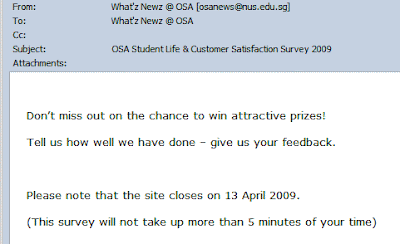
Reminder! Don't miss out! Prizes! - Don't follow a standard Opt-Out scheme such as NUS Groups. Opt-Out rather than Opt-In
Yea, we are a important organization/group that NUS students cannot opt out of! So there is no unsubscribe link at the bottom.
I'm not sure why, but I suddenly find that I am receiving NUS Museum e-mails. And the best part is, they just assumed all NUS students are die hard historians, adding all of them to the mailing list at one go.
Fortunately, there is a unsubscribe link which appears at the bottom for SOME of the mails.
And the mails are not small, with one coming up to 1.2MB. That's about 4% of my mailbox space! That's all right.. NUS students have '1GB' of e-mail space anyway...
- 'Extend' the dateline
So the response was not good? Well perhaps they forgot about it due to exams and projects. How do you send the mailer again to avoid being caught with spamming?

Extend the Closing Date! Create some event and use that opportunity to send a 'reminder' out.
- Send a Reminder Before The Closing Date

Reminder! Those who have not taken the survey! Self explanatory.
The above step by step guide is of course, all fabricated. So what's the point of all these? I tend to send big files to my friends. Powerpoint presentations, Word documents. BIG files. Although IVLE communities exist, sometimes, e-mail is just more convenient. Every KB of that 30000KB e-mail space counts. And then these mailers come in between to take up theprecious space. And then the most scary e-mail comes.. from the 'System Administrator'.. 'Your mailbox is over its size limit'! It threatens to clear now or else! And I will LOSE new incoming mails! Won't even be notified of any mail lost. Announcements, CORS, Modules, Ballot results - nothing will be received! All rejected and I will be lost wondering what important mail I have lost. Fortunately, Outlook Web Access allows sorting of mails by the amount of disk space taken, making cleaning tasks easier. 
No more space to put more mail! In actual fact, NUS students DO NOT have '1GB' of e-mail space. More on that on another post... but some of you know should know what I am talking about So to NUS Staff and Mass E-Mail senders, don't send large attachments/e-mails. If you need to, just send a summary with a LINK or join me in petitioning NUS IT to upgrade NUS Students to a real 1GB e-mail box. Then you can start sending the MBs of stuff.
Go to the study area in SOC. Find a nice study table with a innocent looking chair. Sit down.

A Computer Chair - image stolen Count your lucky stars if you get a chair that doesn't have any one of these problems: - Automatic height adjustment feature. Seat goes down when you sit down, lifts up when you get up.
- Gas lift doesn't work and hence you find yourself the shortest kid in the area unable to raise the chair.
- Leaning back suddenly gets the whole area's people to look at you - the back of the chair creaks loudly
- Leaning back is impossible without you toppling over as the back of the chair leans too much.
- The back of the chair is set to the bottom at the lowest possible giving only lower back support
Regardless, I am thankful for the study areas that NUS SoC is providing as compared to other faculties. When you go to a lab to use the computer...

Check out the ergonomics! The monitor is now higher than you. And you can't lower it. The best you can do is to tilt it downwards.
You still have to tilt up your head to view the top part of the screen. And the chair syndrome also exists there. In the PCs, ClearType is disabled and the Appearance display tab in Display Settings is removed. Probably to stop me from changing the wallpaper. Changing the wallpaper only affects my user account so I can't figure out why NUS has such a policy. And don't get me started on the numerous dialog boxes that you have to close and click OK whenever you login. Up to THREE 'Message of the Day (MOTD)' and there's even one in the webpage that opens up. That's not all... 
Mouse Shit? Eewww I have seen worse than this, this is just one of the moderate cases. And finally... 
Broken Keyboard Stand - Better Ergonomics?
Sometimes you have to wonder, how did that person break it? I'll leave it to your imagination...

New CORS design. With a pretty ang mo and laptop that looks as if they were digitally combined (photoshopped)
In a list of CORS gripes that keep growing, here are three new ones: a) Open Bidding Statistics Why, oh why, doesn't CORS display results of the open bidding statistics right at the Bidding Management page?
Why do I have to go through one long long document for the statistics? See my rant here.
Probable Reason: Requires additional tables and SQL queries that can slow down the system. Right. OK, I am playing cheat here as I have already mentioned this in another blog post. But this issue deserves another mention as I was getting really frustrated from scrolling up and down when looking for open bidding statistics.
b) Not checking for whether I can take a module BEFORE I add a module Minor gripe, why doesn't CORS check the eligibility BEFORE I add a module?

Right, tell me this only after I spend time adding, choosing a module and not before it
A minor usability issue. But it could have saved me 5 minutes of my NUS life! c) Current system time in the bidding page? Why isn't the current system time shown at the bidding page? Every minute/second makes a difference so the time in the system could be different from the time in my watch during the last few minutes. Especially for snipers like me <grin>.
Oh well, perhaps this is one of the ways to prevent last minute bidding and err.. 'save resources'. d) Round 3A starts during term time? Long Round 2A? Why does CORS Round 3A starting during term time?
Why does Round 2A require 3 (that's THREE) days?? Two days is reasonable, but three days just to watch the bid points go higher and higher and higher and .. you get the idea.

Round 3A starts on the Monday, the first day of lessons
And why does a module allocate slots to each faculty rather that letting the faculties compete with each other? Open field, direct competition with all NUS students. "Save resources"? Nonetheless, the new CORS design does improve things alot (the navigation is finally non-javascript based). That's only in the front unfortunately. Once you login, it is still the same old thing.
I'm through with CORS. The tactic works - Wait till 4:55pm and put in your points. Do not bid first (leave it at zero). Got all my modules with this tactic <evil laughter>. Oh no, did I just let out a tip? 
How to win (in) Centralized Online Registration System.
And I am not alone, judging by the increasing number of bidders in the last 15 minutes. And who doesn't want to? The other bidders for the module have the following considerations - They have very little time to make a decision in the last 15 minutes if the bidding gets too high
- They do not want to put too many points in it
- Many will not bother re-checking the bidders as they think the closed bidding period has not much to offer. This is GOOD in one way as there is a potential for you to increase your bid points and go over budget on seeing the number of bidders ballooning. BAD in a way that you could have used the points and module slot to bid for another module if they are too many bidders.
The fact is, the number of bidders play a BIG role. If the bidders are much more than the vacancies available, than you know you have to bid much higher due to the increased competition. Lower than vacancy, you will have to watch for Snipers (as they are known as in eBay; people who bid in the last minute). 
Needless to say, the F5 (Refresh) key is still used before close bidding. Image is stolen.
Next, the NUS Time Table Builder. Often linked to and praised about on how it has helped plan our semesters, this tool is indispensable. 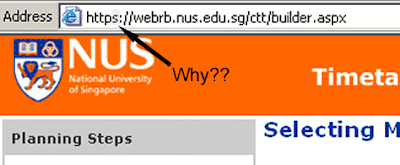
The NUS Timetable Builder
It uses HTTPS. Shh, somebody is going to find out what modules you are going to bid for. It is Top Secret! Encrypted with key length 1024-bits. Nearly undecipherable. Rest assured that nobody can break it within reasonable time. Raaaaight. My planning of the time table is very, very confidential. 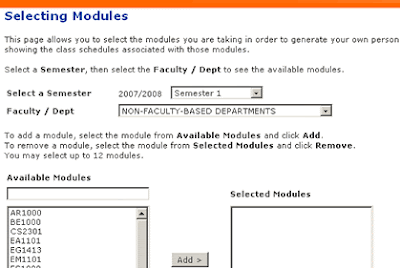
Step 1: Selecting Modules.
Now to select modules. Easy as pie. Select the faculty and add the modules as needed. There's only one problem. The correct semester. The system defaults to Semester 1 for one of the oddest reason I cannot imagine. Those who are used to planning the time tables repeatedly in semester 1 may forget to change the Semester box and end up with the wrong time tables. That's Problem 1. So for this semester, I plan to take CS1105 and CS1231. I also added CS1102Y and CS1102Z so that I can see how it fits into the time table and choose the best class. Hit "Next". 
Oh, a exam clash. That's OK, lets ignore and move on.
Looks like an exam clash. That's fine. Clashing exams will cause problems and cannot be added to CORS either. But since I am adding both of them only for comparison's sake, I click "Next". 
I *know* there's a clash. But I am OK with it!
Show stopper encountered. Problem 2. Now I have to manually generate two time tables to compare. I uncheck the first one and click "Next". 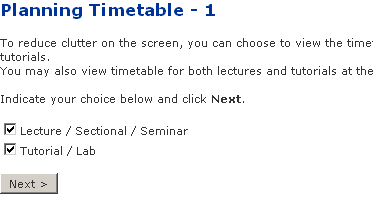
Now to select what to view.
It asks me whether I want to view only lectures and/or tutorials. I find myself always choosing both, so that I can plan tutorials as well. If many people are doing this, this screen should be skipped and provided as an option in the time table screen instead. Hitting "Next" showed me the generated time table. You can select the slots and keep hitting "Rebuild" to show an updated time table. Pretty good. This is where you try with different slots and tutorial slots to get the sleep-and-wake-up-late and 3-off-days-per-week dreams of every NUS student. 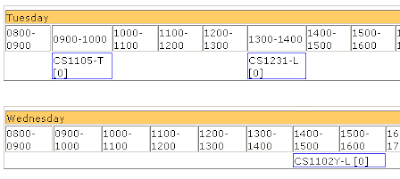
A partial screen shot of the generated timetable
Looks good, but CS1102Y seems to be alone. Oh well, lets see if I can replace it with another module. *digs through CORS listings*. *finds a module* MA1505! It is an 8am lecture module, but it'll help me normalize my waking time so that I do not end up waking up too late everyday. Now, how do I add the module to my beautifully customized lecture and tutorial slot timetable? *looks around the page* 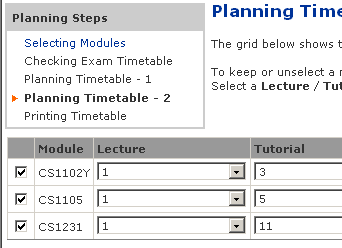
My beautifully customised time table. Now to add a module...
There is a blue link on the top left - "Selecting Modules". That should be it. *click* It brings me to the first page, without any modules selected. Click "Back". Heave a breath of relief on not losing any of the customized data. Quickly do a "Save As" in case something goes wrong. Now I try to hit the "Back" button to the module selection screen. It brings me to the first page again, without any modules selected. So there are no easy ways to add or remove modules other than repeating the whole process again. Problem 3. Neither can you plan a time table with modules that have clashing exam dates. Otherwise, it is still a very good tool. Happy New Year everybody.
The Centralized Online Registration System, the first barrier that all NUS students have to jump over before any semester starts. 
CORS! We meet again!
It comes with two bidding periods: - The open period where you will be able to view the highest, lowest and the next minimum bid.
- The closed period where you will not be able to view any of the above except for the number of bidders. You will be able to view the status of the bids as of before the closing periods in one very long HTML table.
From the official site: 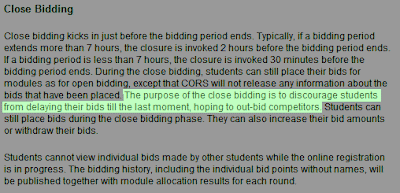
"The purpose of the close bidding is to discourage students from delaying their bids till the last moment, hoping to out-bid competitors"
So, what is stopping a student from doing these? - Place bids only during the closing period
- Place bids only during the last 5 minutes of the closing period to avoid updating the Number of Bidders
Basically, during the closing period, the bidder makes his best bid with the provided information at the end of the opening period. If all bidders follow the above 2 rules, the bidder has to make a maximum bid that he budgeted for the module. 
Imagine everyone keeps quiet until the last 5 minutes of the closed bidding period and then start submitting their bids.
I believe that the actual reason for the closing period is to prevent the system from getting overloaded during the last few minutes of a round. I have heard rumours from the seniors that the system gets very slow during the old times where there were no closing periods. And why not adopt these methods to fix the overload issue? - Convert the system to PHP - a very efficient and fast programming language as compared to the slow and bulky Java that is being used now. Or some other efficient language. Probable reason: Too much resources needed.
- Employ Grid Computing for handling server load, especially during the end times. It *looks* like the CORS system is managed on ONE server. Probable reason: Too much resources needed.
That's the main point - they want to save costs and not invest in more hardware or progamming time. They could have balanced the load between more than one server and even make attempts to optimize the code by switching over to PHP. 
Must save cost! Must solve problem! (Note: 3 images stolen from other sites)
So instead of doing the above, the CORS committee decided to save costs and switch to this luck-based closed bidding system. Ebay anyone? Yahoo Auctions? Imagine if they did like what NUS did to save costs, implement a closed bidding period for popular auctions. The 2 same exact above strategies can be used. Not to say that the CORS system sucks. It does its basic job brilliantly as long as the bidders don't exceed the number of vacancies. But this closing bidding period scheme... well, you get the idea.
(Updated 2/Aug/07) Well, it has been long since an update due to the study break and me trying to make a few bucks. - Freshmen Orientation is 85% games, 15% NUS information

The official site of the Freshmen Orientation Project
See my rant here. Don't attend if you are not into funny games, selling flags or more games!
See the official site or just see the agenda for the Freshmen Orientation Week for this year. - NUS tendered laptops suck (UPDATE 2/Aug/07: Except for the Fujitsu's - see bottom of post). Yes, including those laptops that will be on sale in Matriculation Fair.

Dell offers a wide range of laptops, but do not order them online
For the best bang for the buck, call Dell's corporate line at 1800 3947419 ext 5456 (Dell Corporate - Christina You). Make sure you tell them you are a NUS student and you will get pretty good deals. I got my laptop with more than SG$500 savings.
If you have noticed, NONE of the laptops in the NUS tender have any gaming cards in them. Not a issue if you don't play games but it is a nice extra to have. You can't even upgrade to them as NUS does not allow it for some unknown reason.
Dell is a well known brand, normally assigned to value-for-money and a OK design brand. Of course, if you have the $$$, go for the likes of Sony. But with the 3 year on-site warranty that I got from Dell, I have no regrets. And my laptop required servicing once every 4 months for odd problems.
Also, avoid Windows Vista unless you are able to deal with more problems. If no choice, get the system with Vista. When you finally get a mySOC ID, download Windows XP Service Pack 2 from SOC Internet. It is legal and genuine, as part of Microsoft Academic Program. Hopefully, mySOC still allows it for download and not removed it in place of Vista.
UPDATE 2/Aug/07
Now that the new laptop specs are out, Fujitsu deals are not that bad. They even have a model with a dedicated graphic card. Unfortunately, it is a 15" monster so if size is a concern, the Dell XPS M1210 / M1310 still stands out with its dedicated graphics card.
Also, avoid notebooks that only come with on-campus servicing, especially if you are staying far away from NUS. Go for on-site services where possible for convenience. I had a friend who had to wait more than 1 month for IBM (or Lenovo) to replace a laptop's noisy fan. Lousy on-campus service? You decide.
And go for 2GB RAM where possible, especially if you do programming using Java - a virtual machine that needs lots of RAM.
Finally, understand what you really need. Lugging around a 15 inch laptop everyday to NUS is not going to be a pleasant affair. Games like Maple Story do not require a dedicated graphic card. Ask around. Remember, if you buy from an external party, you miss out all the Adobe, Office 2007 and Windows Vista (<gulp>, more problems) freebies. Here's a full article on the NUS laptops to help you more. - Don't take exemption tests such as MA1301 Introductory Mathematics (for poly students)

No labs, no projects! Who says it's not hard to get MCs?
Did you know that you do not get any modular credits for passing it? Not even a grade! You will just be certifying yourself that you already have the knowledge of MA1301 so that you can take other modules which have it as a pre-requisite.
What's in it for me? Because if you take this as a module, you will get 4 modular credits AND a grade that can push your CAP! Not to mention you complete one Breadth (or Unrestricted Elective, whichever you choose). Even more, you will only need to attend the 1 hr tutorials every week and show your grinning face to get the full attendance score. Just make sure you know your stuff.
Personally, I do not know why CS1231 (Discrete Structures) requires this when every single person I spoke to (that took CS1231) says that it does not use any concepts from MA1301.
Be sure you know your stuff. This could hit back at you if you are not good in the concepts and even pull down your CAP.
More info on the MA1301 Proficiency Test. See the MA1301 module information. - Get to know the CORS system
Meet MR. CORS. Be prepared to verify your home address numerous times (everytime you login ;)
Its not really that complicated - some of them make it so. Find an approachable same-sex (so you don't get distracted heh) senior in the first day of the orientation week and pour all your questions.
The best time is during those times when there's some boring lecture going on - there was one advertising a module about making games so use it to discuss with your senior in a quiet corner so as to not to cause a disturbance.
My personal advice - take the core CS modules first as you are given "protection" - in the form of freshmen-only places - from us seniors as many of us have much more points that you do.
Visit the CORS website. - Read this blog!

It won't take long to adjust. Thankfully, there are no tutorials/labs for most modules in the first 2 weeks.
But seriously, there are some useful links splattered throughout the blog. Here are some links that should help you out (in addition to the ones above):
- Timetable Builder - Use this to plan your modules. Consider travel times between faculties, lunch and off-days where possible.
https://webrb.nus.edu.sg/ctt/builder.aspx
- Module Information Site 1
http://www.cors.nus.edu.sg/CorsSchedule/moduleInfo.html
- Module Information Site 2 (in case the previous goes down - it happens, replace XXX with module code)
https://ivle7.nus.edu.sg/nus/modules/mview.asp?acad_y=2007/2008&mod_c=XXX
- Module Information Site 3 (SOC modules only - click on the module code in the 1st column for more info on a module)
http://www.comp.nus.edu.sg/~online/course_list/
- NUS E-Mail - Important NUS circulars, CORS results and NUS spam
https://exchange.nus.edu.sg
- NUS Friendly Mail - Convert your u0706xxx@nus.edu.sg to something like bertsimpson@nus.edu.sg!
http://www.nus.edu.sg/fea/
- Integrated Virtual Learning Environment - For all module related information
https://ivle.nus.edu.sg
- Used Textbooks Forum - Don't skimp on text books
Offhand I have forgotten the link? If anyone knows it, please post in the comments.
Update 2/Aug/07 - http://ivle.nus.edu.sg/forum/forum.aspx?ForumID={5ec4b811-0ef4-4095-82d4-171e3d61c97c} (requires IVLE login)
Well that is all that comes to my mind for now.
Post in the comments if you want to add on for your juniors (if you are a senior reading this)! Don't forget to start bidding on 30th July 2007! Mark it on your calendar! You can check the bidding schedule here.
I like the free NUS Shuttle Bus service. Without it, I can't imagine walking for 10-15 minutes to Business faculty from School of Computing. Modern looking shiny orange buses. They are a beautiful sight on the roads. The hills provide for a unique experience that can be found in few places in Singapore. Sometimes, I wonder how the full bus ever manages to climb up such a slope. However, the service does come with some *minor* issues. Read on...  This image is stolen from other websites as I couldn't find better ones.
The experience below is recounted from a first person view. I was heading to the Central Library. - (Arrival at the crowded SOC Bus Stop at 1330hrs)
Plan which bus to take. Look at the map at the bus shelter for more information. Wait for Service A1.
- (Bus Service D arrives)
Scratch head on this undocumented new bus. Quickly see the map. No information on Service D. See the bus pole and realise there is a "Service D (TERM Time Only)". See list of bus stop locations which make no sense to a freshie. Make mental note to check the map online.
- (Bus Service A1 arrives)
Now I have two options. To board from the rear or to go by the front. The rear offers a higher chance of securing a seat. The front may leave me behind if the bus gets too full. Wait and see if rear door opens and whether anyone flocks to it.
- (Rear Door opens and someone starts alighting)
To go or not to go? What if he closes the door?
- (Some just-in-time comers rush to the rear door)
Green light! Board from the rear! And many people follow along too.
- (Find Seat)
I find a seat at the centre and the bus starts going. Keep a mental note of where the blue bus stop button is. Keep another mental note on a second bus stop button in case the first doesn't work. And finally, another third note of where a SBS-style-bus-stop button is.
- (Before alighting bus stop)
Now I need to press the bus stop button. I see 3 buttons on top. Press all. None work. SHIT!
- (Rushing for the button)
Rush for the 2nd backup button and press. Nothing. Panicking, I press the SBS-style-bus-stop button at the roof of the bus. IT WORKS! I recall one of the 3 buttons worked last time in the other bus...
- (Alighting at central library)
Bus stops in an odd position - a 30 degrees downwards slope. As I was seated in the centre of the bus near the window, the primary task was to get off while maintaining balance.
- (Check Service D Map Position Online)
Found it here. No information on bus stop location. Map quality sucks. Resorted to taking the bus myself to explore.
We hope you enjoyed the tour of the NUS Shuttle Bus Experience!
The holidays are almost over! I've just checked the Exam Results site for my New Year present from NUS. Well, I can say it has been a bad start. As usual I plough through the summary of degree requirements, Timetable Builder and Module Information (computing modules mirror). So now, back to meeting Mr. CORS. Been a long time since I saw you ol' buddy. The last time I saw you was during tutorial registration. And I see you have been up to some extra irritating things again. - The Dreaded Login Screen
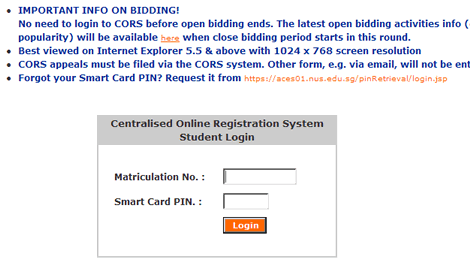
I meet the login screen again. Doesn't support IE's AutoComplete. Doesn't support "Remember Me". Did I mention that this screen forced me to open it in a new window?
- Having to confirm my address *everytime* I login

Seriously, I've checked the address 1,384,493,943 times and it is correct. I will inform the Admin Registar if Osama decides to kidnap me. You have my word, Mr. CORS.
-
Not Allowing Me to view any Module Information (Irritation of the Year Award ?????) 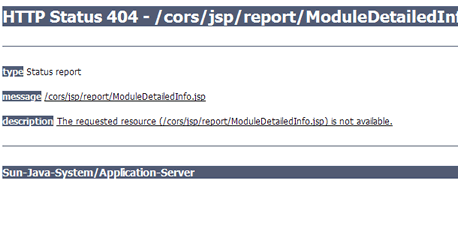
From http://www.cors.nus.edu.sg/CorsSchedule/moduleInfo.html, I click on Faculty Modules, and get presented with the above screen. Is this really needed during the bidding period? And it has been happening for 2 days.
Luckily, there's the SOC Course List for SOC modules. Clicking the course code shows the pre-requisites and other info.
For SS and UE's outside faculty, I have to LL and ask around.
Happy Bidding, fellow colleagues. Just don't compete with me :-)
Due to the mid terms, I did not have time to add entries to the blog. Final exams are about a month away so updates may not be as frequent. - Take Care of your Belongings!!
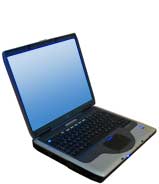 To risk or not to risk
Every once and then, I see students leaving their laptops on the benches for a quick toilet break. Or to buy a meal at the canteen. Even at places with very few people.
Don't. Shut the lid, put the laptop in your bag and bring it along with you. The value of that 5 minutes could be worth $2,500 if something bad happens.
Squeeze in EFFICIENTLY in Service Bus 95 (and perhaps other buses) during peak hours 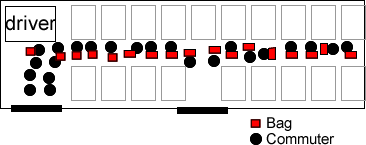 Most of the time, this is how a full bus looks like from the top (common in Service 95)
The PPF of efficient bus squeezing:
Most of the time, this is how a full bus looks like from the top (common in Service 95)
The PPF of efficient bus squeezing:
Part with your boyfriend / girlfriend / friend / mother / father / brother / sister / etc temporarily.
Put your bags in front of you or carry it in front of you.
Form two rows, that's two rows from the back to the front
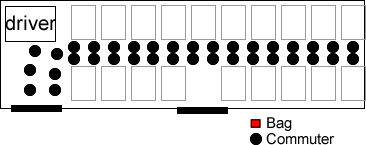 Now with this layout, more people can board the bus (the bags are placed between your legs or hand carried)
This ONLY applies to SBS buses entering NUS. Commuters taking internal shuttle buses should NOT follow the two-row rule as it will not allow greater maneuverability within the bus.
Of course, those alighting at NUH (with Service 95) will be having trouble especially if he/she is stuck in the end. My advise is to try to stand near the exits for those getting off at NUH.
Or try alternative buses - there is a bus stop near the expressway outside NUH:
Now with this layout, more people can board the bus (the bags are placed between your legs or hand carried)
This ONLY applies to SBS buses entering NUS. Commuters taking internal shuttle buses should NOT follow the two-row rule as it will not allow greater maneuverability within the bus.
Of course, those alighting at NUH (with Service 95) will be having trouble especially if he/she is stuck in the end. My advise is to try to stand near the exits for those getting off at NUH.
Or try alternative buses - there is a bus stop near the expressway outside NUH: 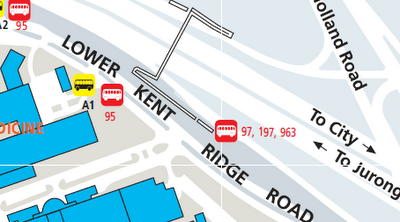 Try Service 97, 197 or 963 to NUH instead of Service 95 to avoid the crowds
- Don't eat or drink during Lectures
 The sign is there for decoration purpose?
All lecture theatres prohibit eating or drinking. Plain water drinking is allowed.
But when someone brings in a hamburger, a cup of ice milo and sits in front of me, I tend to get very distracted. The smell itself makes the stomach growl especially when you are hungry.
Imagine those having the Ramadan fasting period...
The sign is there for decoration purpose?
All lecture theatres prohibit eating or drinking. Plain water drinking is allowed.
But when someone brings in a hamburger, a cup of ice milo and sits in front of me, I tend to get very distracted. The smell itself makes the stomach growl especially when you are hungry.
Imagine those having the Ramadan fasting period...
- Don't discuss or chat during Lectures
 Talk only when needed. There are benches outside for your convenience.
Another distracting element. People behind you talking something else when the lecture is about Java Programming.
If you need to talk, I am sure you can not do two things at once. Please go outside and talk or wait till the break.
Talk only when needed. There are benches outside for your convenience.
Another distracting element. People behind you talking something else when the lecture is about Java Programming.
If you need to talk, I am sure you can not do two things at once. Please go outside and talk or wait till the break.
- Use deodorants
 Deodorants mask/prevent the bad smell when you sweat
In a crowded area such as the bus and the distance between other commuters is very little, the last thing we want is the nasty smell from your arm pit.
Deodorants mask/prevent the bad smell when you sweat
In a crowded area such as the bus and the distance between other commuters is very little, the last thing we want is the nasty smell from your arm pit.
- Form holes in Queues for easier and faster exits
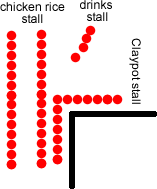 Exiting from drinks stall and claypot stall means cutting at least 2 queues
After buying a meal from a stall, I have to find a way to cut through the queues to get to my seat. Most of the time it goes okay, but sometimes people have to move back
Exiting from drinks stall and claypot stall means cutting at least 2 queues
After buying a meal from a stall, I have to find a way to cut through the queues to get to my seat. Most of the time it goes okay, but sometimes people have to move back
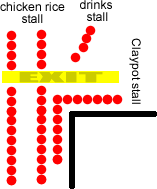 Now, with holes, people can exit faster.
- Common Courtesy
Don't step on the lecture chairs to get to a particular seat. Don't play games during lecture - its distracting - play it at the back of the lecture room.
Don't put your feet on the seat in front of you to make yourself comfortable.
|


![You are expected to check your e-mail regularly [ source ]](https://blogger.googleusercontent.com/img/b/R29vZ2xl/AVvXsEj7xxWyYOJIY81rvXv0VMPdYYZQSpDwQahOKIHUuLUXfE7Yqehs7rrfkJtjgeIY99KVw7hXS1GUYI8uUOwcmaKYUtiffcJnyeQbqoMecFfCQzHoLo_lfPCURMhzTZKJIugGCqSoLQ/s1600-h/tech.jpg)


 This image is stolen from other websites as I couldn't find better ones.
 To risk or not to risk
  Most of the time, this is how a full bus looks like from the top (common in Service 95)
The PPF of efficient bus squeezing:
Most of the time, this is how a full bus looks like from the top (common in Service 95)
The PPF of efficient bus squeezing: Now with this layout, more people can board the bus (the bags are placed between your legs or hand carried)
This ONLY applies to SBS buses entering NUS. Commuters taking internal shuttle buses should NOT follow the two-row rule as it will not allow greater maneuverability within the bus.
Of course, those alighting at NUH (with Service 95) will be having trouble especially if he/she is stuck in the end. My advise is to try to stand near the exits for those getting off at NUH.
Or try alternative buses - there is a bus stop near the expressway outside NUH:
Now with this layout, more people can board the bus (the bags are placed between your legs or hand carried)
This ONLY applies to SBS buses entering NUS. Commuters taking internal shuttle buses should NOT follow the two-row rule as it will not allow greater maneuverability within the bus.
Of course, those alighting at NUH (with Service 95) will be having trouble especially if he/she is stuck in the end. My advise is to try to stand near the exits for those getting off at NUH.
Or try alternative buses - there is a bus stop near the expressway outside NUH:  Try Service 97, 197 or 963 to NUH instead of Service 95 to avoid the crowds
 The sign is there for decoration purpose?
All lecture theatres prohibit eating or drinking. Plain water drinking is allowed.
But when someone brings in a hamburger, a cup of ice milo and sits in front of me, I tend to get very distracted. The smell itself makes the stomach growl especially when you are hungry.
Imagine those having the Ramadan fasting period...
The sign is there for decoration purpose?
All lecture theatres prohibit eating or drinking. Plain water drinking is allowed.
But when someone brings in a hamburger, a cup of ice milo and sits in front of me, I tend to get very distracted. The smell itself makes the stomach growl especially when you are hungry.
Imagine those having the Ramadan fasting period...  Talk only when needed. There are benches outside for your convenience.
Another distracting element. People behind you talking something else when the lecture is about Java Programming.
If you need to talk, I am sure you can not do two things at once. Please go outside and talk or wait till the break.
Talk only when needed. There are benches outside for your convenience.
Another distracting element. People behind you talking something else when the lecture is about Java Programming.
If you need to talk, I am sure you can not do two things at once. Please go outside and talk or wait till the break.  Deodorants mask/prevent the bad smell when you sweat
In a crowded area such as the bus and the distance between other commuters is very little, the last thing we want is the nasty smell from your arm pit.
Deodorants mask/prevent the bad smell when you sweat
In a crowded area such as the bus and the distance between other commuters is very little, the last thing we want is the nasty smell from your arm pit. Exiting from drinks stall and claypot stall means cutting at least 2 queues
After buying a meal from a stall, I have to find a way to cut through the queues to get to my seat. Most of the time it goes okay, but sometimes people have to move back
Exiting from drinks stall and claypot stall means cutting at least 2 queues
After buying a meal from a stall, I have to find a way to cut through the queues to get to my seat. Most of the time it goes okay, but sometimes people have to move back
 Now, with holes, people can exit faster.