
Sunday, 8 April 2007

Bittorrent in NUS

Bitty Bitty Bit Torrent in NUS!
The Bittorrent Logo

DISCLAIMER: This post is in my personal opinion and may be RIGHT or WRONG! So do your homework before trying the stuff out!

There have been some queries in the comments (Ok, there's only one, but the referrer logs show many entries).

So, does bit torrent downloading work in the NUS network using a personal laptop?

Short answer

It works partially but not at optimal speed. Use it for legal purposes only.

Long answer:

NUS's routers do not support (or are disabled for security reasons) UPNP (What is it?), so speed is limited by the number of computers you connect to, and not the number of people who connect to you first, as the router does not know how to forward the packet from the other computers to your computer.

The Universal Plug and Play Logo

So, the speed you get will not be optimal but the data will download.

Is it illegal?

According to NUS Acceptable Usage Policy, it is not against the policy to use Bittorrent in the network.

However, what you use it to download can overturn that (Section 4.1 in NUS AUP). For example, if you use it to download copyrighted movies, songs, mp3s and other illegal content, then it is illegal.

But if you use it to download open source software like the Linux variants, then it should be OK.

Legal Downloads? Where?

So, what can we download legally?

  • You can download Linux variants to experiment such as Ubuntu
  • There are a host of completely legal torrents at http://www.legaltorrents.com such as movies, games, mp3, etc.
  • This blog post has a list of sites with legal downloads.

Also, go for torrents with a high number of seeds for better speeds.

utorrent
The most popular Bittorrent client

There you go. Download utorrent and start torrentin'.

UPDATE (8/Apr/07): Here is a blog post by someone in NUS who was caught download a copyrighted TV Series Heroes. So be careful!
Sunday, 4 February 2007

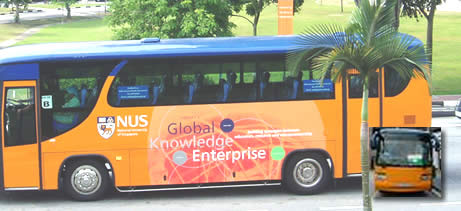
The NUS Shuttle Bus Experience

I like the free NUS Shuttle Bus service. Without it, I can't imagine walking for 10-15 minutes to Business faculty from School of Computing. Modern looking shiny orange buses. They are a beautiful sight on the roads.

The hills provide for a unique experience that can be found in few places in Singapore. Sometimes, I wonder how the full bus ever manages to climb up such a slope.

However, the service does come with some *minor* issues. Read on...

NUS Shuttle Bus This image is stolen from other websites as I couldn't find better ones.

The experience below is recounted from a first person view. I was heading to the Central Library.

  1. (Arrival at the crowded SOC Bus Stop at 1330hrs) Plan which bus to take. Look at the map at the bus shelter for more information. Wait for Service A1.
  2. (Bus Service D arrives) Scratch head on this undocumented new bus. Quickly see the map. No information on Service D. See the bus pole and realise there is a "Service D (TERM Time Only)". See list of bus stop locations which make no sense to a freshie. Make mental note to check the map online.
  3. (Bus Service A1 arrives) Now I have two options. To board from the rear or to go by the front. The rear offers a higher chance of securing a seat. The front may leave me behind if the bus gets too full. Wait and see if rear door opens and whether anyone flocks to it.
  4. (Rear Door opens and someone starts alighting) To go or not to go? What if he closes the door?
  5. (Some just-in-time comers rush to the rear door) Green light! Board from the rear! And many people follow along too.
  6. (Find Seat) I find a seat at the centre and the bus starts going. Keep a mental note of where the blue bus stop button is. Keep another mental note on a second bus stop button in case the first doesn't work. And finally, another third note of where a SBS-style-bus-stop button is.
  7. (Before alighting bus stop) Now I need to press the bus stop button. I see 3 buttons on top. Press all. None work. SHIT!
  8. (Rushing for the button) Rush for the 2nd backup button and press. Nothing. Panicking, I press the SBS-style-bus-stop button at the roof of the bus. IT WORKS! I recall one of the 3 buttons worked last time in the other bus...
  9. (Alighting at central library) Bus stops in an odd position - a 30 degrees downwards slope. As I was seated in the centre of the bus near the window, the primary task was to get off while maintaining balance.
  10. (Check Service D Map Position Online) Found it here. No information on bus stop location. Map quality sucks. Resorted to taking the bus myself to explore.

We hope you enjoyed the tour of the NUS Shuttle Bus Experience!

Tuesday, 2 January 2007

Mathematics with Java Doubles

Sun's Java LogoToday, I was trying to revise Java before the term starts. While in the process, I hit a simple addition problem:

System.out.print(124.4 + 18.2); //Outputs 142.6 System.out.print(124.6 + 18.2); //Should output 142.8, right? No... //... // //it outputs 142.7999999999999!

Weird no? After a bit of googling, I found out that this was due to the Java Language Specification, with doubles being converted to strings. (I don't understand the reasoning either)

The solution is to use the BigDecimal class. Wrap each of the double values in a BigDecimal class and invoke the add method in it.

Well, that didn't work properly. In fact, it got worse:

BigDecimal num1 = new BigDecimal(124.6); BigDecimal num2 = new BigDecimal(18.2); System.out.print(num1.add(num2)); //Outputs 142.7999999999999936051153781590983271598815917968

The problem is still there!

Turns out that the solution was very simple:

BigDecimal num1 = new BigDecimal("124.6"); BigDecimal num2 = new BigDecimal("18.2"); System.out.print(num1.add(num2)); //Outputs 142.8 - FINALLY!!

So ladies and gentlemen, remember to use the BigDecimal for your decimal calculations AND to pass the value as a String! Or you will see funny long numbers appearing mysteriously!

It's back to school next week! Looking forward to meeting new faces!