

So you want to win your modules in Centralised Online Registration System? You want to use at little points as possible. And you want to secure the modules with as few points as possible.
Mr. CORS. We meet again. For the last time...

This post summarizes some knowledge from my experience before it expires into long term memory. Many of them can sound bad and going against general bidding ethics.
Make sure you have planned your timetable with NUS Timetable Builder. You cannot bid for a module if its timetable or exam dates clash with any of the modules you already have or are bidding for. Have some backup replacement modules and don't fix on just 5 modules.
And yes, you can have fun with CORs as well.
- Treat it like eBay
CORS is like eBay. Except that it has a stupid thing called Closed Bidding Period, where you can only see the number of bidders in the final few hours.
But you can withdraw bids without *any* penalty. Now that opens up many more doors. Retraction of bids in eBay is recorded in your feedback but in CORS, there's no penalty..
Which is why, many eBay tricks can be applied in CORS. They will be elaborated on below.
EBay, where all snipers are bred and trained.. (Image stolen)
- Take popular modules later when you have more points
This you should already know. Especially if you are a freshie. Just like when something you are watching reaches too high a price, you forget about it and wait for another to show up. As a freshie, you have so many modules that you can bid for. And as the years goes by, your choices of modules will get lesser and lesser.
A lot of seniors will recommend planning ahead for your full term in NUS. For me, I don't recommend this. Why? Because as you spend more time in NUS, you will find new modules that you have never heard before. As a freshmen, how many modules would you have known already? That's why I did planning only in my 3rd year.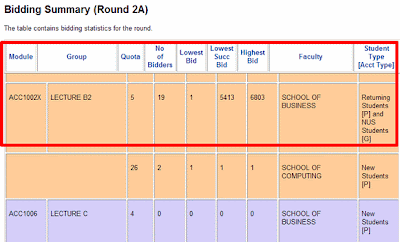
Hope those 5 winners are in their last semester, they just squandered 90% of their points when the New Student slot still has 24 left... [source]
- Selecting Modules When You Are a Freshie
Don't take the easy modules like CS1105 when you are starting off. You can always take these modules later and not many modules require them as a pre-requisite. If the demand exceeds vacancy, think of switching to other modules.
For the first few semesters, mix modules that you can get for one point as having a major share in the modules you need to take for the semester. For example, for your first semester of your first year, you can take 1 popular module and 4 unpopular ones.
If the module's demand exceeds by about 10% in CORS by the end of the open round (Trust me many of them won't follow rule #4), consider seriously replacing it with another module. Like saving money in the bank, you want to save points for future use as CORS does not delete points every semester.
That doesn't mean you should drop the module the moment it exceeds demand. Some modules always require mandatory fighting for it as its demand always exceeds vacancy. For these kind of modules, try to take them later when you have more points.
When the number of vacancies for the module are alot, like 50+, 100+, chances are high that you won't have to spend too many points to get it, but don't put just one point! Put your maximum you are willing to pay for it. There will definitely be a few bidders who put only a few points.
- Bid only at the Last Minute
Known on eBay as sniping. Place your bids only in the last 10 minutes of the round.
Until then, leave it at zero points. Placing even a single point will increase the number of bidders by one - this is updated realtime even during the closed bidding period. Several pros and cons
Being a sniper is not easy with all these preparations. And be careful not to miss the deadline (Image stolen)
- Some of the bidders would have placed their maximum bids and ignored the closing period
- If the bidders are less than the number of vacancies, there is a very high chance that some of them bid only 1 point and did not bother about it
- The time for bidders to change their bids is very small.
- The time for you to change your modules is very little if you find the number of bidders suddenly increasing at a high rate at the last minute.
- If it is a level 1 or level 2 module with 50+ vacancies and the number of bidders are less than demand before the closing period, chances are high that many of them did not place too many points.
- If the module has a very small number of vacancies, this strategy works great too. Especially in a one vacancy module, the lone bidder may just put in a low bid point thinking that he is the only bidder. When you bid at the last minute, you catch him by surprise and he may not even have noticed it until he gets his results.
- Some of the bidders would have placed their maximum bids and ignored the closing period
- Secure *Other* Modules in Early Rounds
In the early rounds, your competition is significantly less than at the later rounds. Use this to your advantage and secure modules that you wouldn't normally take in case you find out later that the modules that you are planning to take in later rounds require more points to bid.
So even if you were not planning to take CS1105 this semester, and you see it with few bidders and lots of vacancies in Round 1, go ahead and grab it first. Grabbing it later may result in you paying more points than necessary when more bidders can bid for it. And use the Module Preference Exercise (MPE) exercise to get modules that you may not need early on as well.
CORs limits on the maximum number of modules you can bid for in the early rounds to 5 modules. This can be a disadvantage if you plan to take 5 modules for the semester as you will not have any buffer slot to check the bidding status of a module.
Not to fret, CORs publishes the statistics of the bidding statuses in a list under 'Useful Information' when the opening period ends. However, they are only accurate as of publishing time. The other way is to get a buddy to temporarily drop his module and add the module you want. Troublesome, but that's the only way if you want the latest updated information on the number of bidders.
- Protected Slots For FreshMen
Freshmen enjoy a special privilege. Protected Slots. This means that until the end of Round 2B, all modules will have a certain quota that will fit only freshies.
So what does this mean? In summary
Why do fresh always remind me of oranges? Yumm... Image Stolen
- All the people you are bidding with can only bid a maximum of about 650 points from programme account and about 350 points from general account (for SoC students - see under 'Allocation of Points'). Remember, some faculties award higher points to the general account or programme account.
- If you are a freshie, the number of bidders you see in the CORs bidding page are all freshmen with about the same number of starting points you have until Round 2B ends. This levels the playing field. So instead of you trying to fight with us seniors who may have more than 4,000 points, you only fight with your new peers who have about a maximum of 650 points to spend.
- A chance to secure modules which are very popular as the seniors will not be able to compete with you and your competition is only limited to the freshmen. However, note that some modules don't have any special allocation for new students. For example, SS modules.
- Unfortunately, this also means that you can't join in the regular queue if the number of bidders in the senior queue are lesser. Take for example, CS2105 Lecture 2 as of Round 2A Opening Period for 2009/2010, the Returning Students Queue has no students bidding for the 17 slots yet the New Students queue is on the brink of a fight if an extra bidder joins in.
For example, if there is one vacancy for MA1301 and Bidder A,B and C placed their bids of 400 pts in the morning, afternoon and evening, the winner will be Bidder A as he/she placed the bid first. Remember, your peers bidding for that module only have about 400 pts for General account. Personally I recommend bidding for such modules in the next round or semester.
NOTE: Different faculties has different top-ups of points every semester. See this page under 'Allocation of Points'. Doesn't mean that all the peers you are bidding with have exactly 650 points. Some faculties like Engineering have 750 points in their Program account.
- All the people you are bidding with can only bid a maximum of about 650 points from programme account and about 350 points from general account (for SoC students - see under 'Allocation of Points'). Remember, some faculties award higher points to the general account or programme account.
- Don't Rush to take GEMs, SS and Breadths Early
For some reason, many freshies opt to fulfil their SS and GEM requirements early. This means that you may have to forego popular [easy] modules.
Save up your points in your General account and bid for your favourite SSs and GEMs in the final 2 years. Until then you can bid for modules which require only one point with your General account.
- Money Can Talk
In NUS, you stay longer, you get to save more points as you bid for fewer modules for every semester. Those who want to finish NUS studies early will find it more harder to secure their 6 or more modules for every semester due to the limited number of points they get for every semester.
Of course, then you will have to spend more money as you stay on for the extra semester or two.
Almost everywhere, money can talk. With fewer modules, you'll have an easier time as well. (Image stolen)
- Red Carpet Treatment for Graduating Students
If you can't secure a required module until your final semester, CORs Appeal can work wonders. Even if the module is over full, they may somehow squeeze you in.
Note that I am not guaranteeing that you will get a slot in the final semester no matter how full or high the bidding point is, but this is what I have heard.
Also, I've heard final year students even having the privilege of replacing a module that is required to be taken for graduation with another similar level module when the module is overfull. Talk about working around graduation requirements!
Red Carpet Treatment (Image stolen)
- Not everything has to go through CORs Appeal.
If you don't meet the pre-requisite for a module but believe you have taken a module that is very similar to the requirement, you can always e-mail the course coordinator and ask for a waiver.
And if CORs keeps shouting "You do not satisfy the pre-requisites for or has read a preclusion module for this module!" even though you meet the pre-reqs, e-mail your course coordinator too. Don't wait until you can appeal.
- Be careful of One Vacancy Modules
In modules with only one vacancy, the winner pays the full bid price as there is no minimum bid to refund your points partially. Think very carefully before you bid for such modules. Modules with such vacancies only occur from Round 2B onwards, when the odd student drops a popular module. - Have fun - Sabotage Other Modules
This is not really a tip but something to do to create demand for a module. Known as shill bidding in eBay. Okaaay, this is for fun. Perhaps I am sounding bad, but hey, I got points to squander <evil laughter>
So, what you do is check the stats of the modules available in the current round (*before* the closing period) and narrow those with very few vacancies and something you can bid for. Then go and dump all your points into the module for the one likely to have a big bidding fight. Now the closing bid statistics will show you competing for the module. Once the closing period comes in, change your bid to 1. You won't get the module, and even if you did in the one in a billionth rare chance, it's just one point wasted. Or just retract the bid in the last minute.
So, how can one person make a big difference? Actually, you can. Go for those modules which have very small vacancies.. those in the single digit... <evil laughter>
Guess who was one of the bidders for ACC1002X above...
Is this what you call - Having fun with CORS? [source]


Well that's all I can share for now. Good luck bidding, hope it will help fellow juniors in future.
Behind the curtains, I await... sniper rifle in position.. (Image stolen)

Common FAQ: So how many points should I bid? No one can give you a definite answer for this as it depends on many variables. You will need to make your own independent decision with the tips above.
If you have more tips, share in the comments below. Not all of you may agree with my tips, but feel free to discuss below. Have fun!


