|
|
(UPDATED 22 Dec 1925PM, at end of article) (UPDATED 22 Dec 1210PM, at end of article) NUS has released a 'enormous benefits' system that requires VPN access to get your exam results. The old exams page is no longer up, neither is there any information there on how to get the exam results. 
How to get my NUS exam results! How? How! (Image stolen)
Most of the online exam results should be released by 12pm Tuesday 22-Dec-2009 with some up to 5pm (non-graduating students) The easy way for those in Singapore Just SMS NUS<space>EXAMS<space><Matriculation Number/Registration Number><space><6-Digit PIN> to 78277.
Example: NUS EXAMS U001111A 123456
What is my 6 digit PIN number?
Source The hard and complicated way that requires JAVA or VPN access (means any intranet cafe may be out if they don't have JAVA installed!) myISIS Login (Navigation: Login to ISIS > Self Service > Student Center > select “View My Exam Results” from Academics Section) Note: To access myISIS off campus, please log-in through NUS WebVPN first. The steps are as follow: 1. Make sure your PC/laptop language setting is English 2. Go to https://webvpn.nus.edu.sg/ 3. User ID = your User ID/NUSNET ID 4. Password = Your NUSNET Password 5. Domain = NUSSTU 6. Once log-on successfully, you will see the page below: 7. Open a new internet page 8. Go to: https://myisis.nus.edu.sg/ 9. User ID = your User ID/NUSNET ID 10. Password = Your NUSNET Password
If you need to access the site from a cafe and don't have Java installed, you're SOL. Borrow a laptop or beg the cyber cafe owner to allow you to install Java. The above information is from: https://share.nus.edu.sg/registrar/student/exam/releasedates.htm (there are some pics here to walk you through, but I just used SOC VPN and accessed MYISIS). You may need to login with your username - NUSSTU/<matric> and password to access the share link. Good luck for all your results... as I hope for mine... UPDATE 22 Dec 1210PM: From the comments, looks like those trying to access MYISIS via WebVPN have a new problem - "The WebVPN service is currently unable to login more users. Please try to access it later. To report this issue, please contact ITCare at 6516 2080 or email ITCare@nus.edu.sg" - There are some ways around this - Use NUS VPN. Follow guide here. You may need to login using your NUSNET account.
- Use SOC VPN. Follow guide here. You may need to login using your NUSNET account.
- Use SMS
The easiest and fastest is via SMS. Be patient, I had to wait about 15 minutes for my results when I SMSed at about 1105AM. Useful links for those with the results - Cap Calculator - http://www.fas.nus.edu.sg/docs/undergrad/cap_cal.htm - be sure to use a fake name and number (start with U06) or else somebody else can access your results!
- Review of Exam Results - https://share.nus.edu.sg/registrar/student/exam/student.htm
- Satisfactory / Unsatisfactory Option - https://aces01.nus.edu.sg/passfail/StudentLogin
- CORS Bidding Schedule - http://www.cors.nus.edu.sg/schedule.html
UPDATE 22 Dec 1925PM: Thanks to a anonymous commenter, access MyISIS directly here! No stinky VPN needed!
Besides the regular CORS and IVLE alerts that I look forward to receiving in my mail, most of the mails in the account are advertising (read: spam) forwarded and sent by NUS members. It is quickly reaching to a level where many minor events are sent in e-mails to the whole NUS even though it affects only a small percentage of the recipients. For example: Sports facility closures, various student competitions held by external organisations, any NUS event that needs people to fill up the space, job postings no matter how small, sports trials... ![You are expected to check your e-mail regularly [ source ]](https://blogger.googleusercontent.com/img/b/R29vZ2xl/AVvXsEj-zXjeFTMZuXWhvzi8K_Gg-bg5P57-K52IF55J8woi9ps-vcLgWYtFjyl1QiGfVFhuASDhI8X_PZTcWfWSp8-D3SnhjtnwcJLgdOlhyphenhyphenvouaBkRf8sSFzr1vpXQvN1tNEhPQV4AnA/s400/outlook.jpg)
You are expected to check your e-mail regularly [ source ]
And the list goes on .. SOC Technical Services sends 'Patches' alerts everytime there's a Windows or Office patch released. Never mind that Automatic Update takes care of this already. Then there's Estate & Development News sending restaurant closure / opening alerts. Then there's What'z Newz @ OSA with 90% useless news (e.g. Free Entry to NHB Museums, NUS Volunteering Network recruitment) and useful news (such as the Transitlink Card Replacement) so you can't block them... the list can go on. 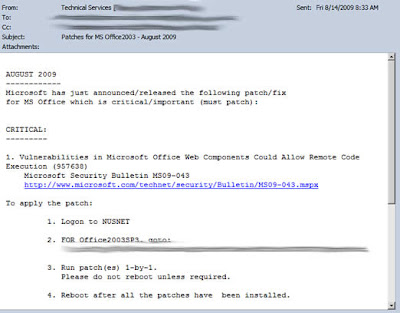
Weekly Patches E-Mail.. when Automatic Updates already does it... No way to unsubscribe..
Such news should be posted on their own web pages and not e-mailed out to all the students in NUS. Perhaps because NUS mail is so easy, just compose and send. Updating the webpages may require more steps due to the publicness of the web pages. Most of their mails don't take up much space but they do take up my time as I have to skim through each of them and delete them. And those big emails.. those more than 100KB.. taking up valuable email space... those are the most problematic ones. Here's a peek at some of the spam I have received. If you are a company, you now know who to contact to spam the 100% guaranteed verified NUS student mailing list. - Toshiba laptops offer sent by NUSSU Bizcom Nustyle (with a 830KB image attachment)
Two mails, each 1MB, was sent with a big image as a attachment.

ATTENTION! Toshiba laptops offers! And it advertises only for Toshiba laptops. Lenovo, Apple and other NUS tenders were not given this excellent marketing opportunity to reach NUS students.
How did Toshiba managed to convince NUStyle to send the advertising?
- Annual Kaspersky Lab IT Security Student Conference from SOC (sent 3 times by 3 different senders)
A job position hiding behind a security competition event...

Annual Kaspersky Lab IT Security Student Conference
And the mail was sent 3 times to all SOC students, with two mails being 500KB. Props to NUS Students' Computing Club for not sending the attachment. They were also the first one to send this out, while the other two just forwarded the mails to all SOC students without checking.
- AIA Campus Photo Contest 2009 sent by NUSSU Bizcom
Learn a new marketing strategy today:
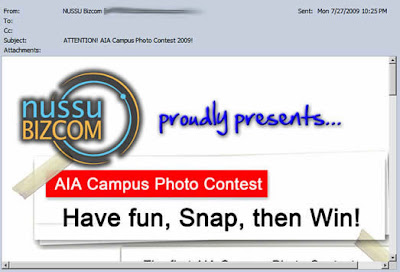
AIA Campus Photo Contest 2009
Just hold a contest, even a simple one like a photo contest, and you instantly get an opportunity to advertise your company to NUS students. And save on the fees for hiring a design firm.
- Ubisoft Singapore Facebook Page sent by SOC
This may be of interest to the Communication and Design majors, but to ALL SOC students??
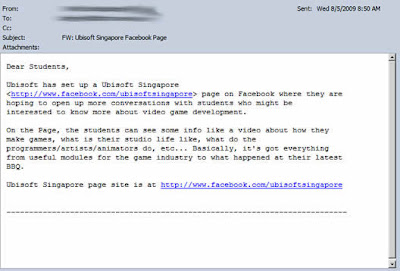
FW: Ubisoft Singapore Facebook Page
- Events Totally Not Related To Some Students
Such as this launch of CLing, a *totally* mandarin event, sent to all students. A 1MB email.
Instead of sending to only Chinese students, the email is sent to the whole school.

FW: Business China - An Invitation to the Launch of...
Thank you for wasting 10 minutes of my time reading through the whole email only to find out that it is conducted in a language I don't know.
- CCA Advertisements (743KB email)
So you are running out of members in your CCA and have a strong connection with What's Newz @ OSA...

NUS English and Chinese Debaters Recruitment Drive
IF I wanted to sign up for the CCA, I would have done so during the Matriculation Fair.
Imagine if all the CCAs send emails to recruit more members...
- Swensen's (500KB email)
Another event not completely related to NUS.
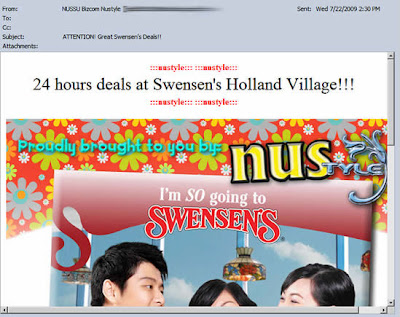
ATTENTION! Great Swensen's Deals!
There is a unsubscribe notice at the bottom, but I wonder whether it really does work (the email ends with edu.sg.com).
- Plus many mails from NUS Career Centre
In July 2009, they sent 5 mails. In May 2009, 14 mails.

eNewsletters you can't unsubscribe from..
- And Career Notices From Other Unknown Sources
Even SOC Unix e-mail accounts have spam.

part-time marketing research job available
This mail was sent to my SOC UNIX e-mail account. I wonder how they got hold of my UNIX e-mail account which I never used in the first place.. Hmmm?
See my previous post and this post for more past e-mail rants.
My humble request to all NUS email senders, please use NUS groups. This way, we can opt out and in various mailing lists. Except CORS and IVLE. The worrying thing is that some senders send important information as well as useless information using the same e-mail alias (e.g. 'What'z Newz @ OSA' and the SOC staff). That is why it is so dangerous to automatically direct them to the Junk folder based on the sender's e-mail address. Strangely enough, events that deserves to be e-mailed don't get e-mailed. For example, when the CORS rounds start, an e-mail should be sent one day beforehand to remind all students to bid. And when a tutorial balloting round starts, another e-mail should be sent if the student is eligible to rank in the first round. Similarly, when the closed bidding period is starting and I have been either outbid or the module has higher demand than vacancy, a warning e-mail should be sent too. This is what e-mail should be used for... but... (gritting teeth)... must.. tolerate... one... more... semester...
(Updated 4th January 2010) Going through my analytics, people are coming to my blog with some questions not really covered in my blog. Here is a collation of the most frequently asked questions with my best answers. Again, note that this is unofficial.  - Can I convert my breadth module to an Unrestricted Elective?
Ask the person in charge of the module. In some cases it may be possible.
- Where can I download the latest street map / road map / shuttle bus routes of the NUS campus?
Go here
- Where is the bookshop in NUS?
It is called CO-OP. Here are the locations in NUS. But try the Clementi Book Store instead for possibly lower prices. See my other post. The prices for many textbooks at Clementi Book Store are cheaper than NUS Co-op outlets even after their discounts.
And no, you can't check CO-OP textbook prices online - you have to go there manually to check prices. There is a queue line at the inside-back-right of the store specifically to buy course textbooks. You may also want to try buying 2nd hand used textbooks in IVLE.
- When does the NUS school term start?
See the updated and future calendar term PDF calendars here
- Do NUS lectures take attendance?
No unless specifically stated by the module.
- Can I attend other lectures which I am not allocated?
By right, you are not allowed to attend other lectures, but by left, no one cares. Just be sure to have your matric card in case of security screenings (which I never encountered).
- Can I download my previous year results in a single PDF file?
You can download your past exam results transcript in one document via MyISIS. Login, click Self-Help, Academic Records, View Unofficial Transcript.
- How do I configure my laptop to connect to the encrypted NUS wireless network?
Go here and see under NUS PEAP Configuration Wireless. If it prompts for your username, enter nusstu\<your matric> for username (e.g. 'nusstu\u0910343), and your NUSNET password. Avoid using the NUSOPEN wireless network unless you are using encrypted or HTTPS encrypted websites.
Using NUSOPEN means anyone can snoop on the data you are sending and receiving with a laptop and some specialized software. For example, logging into hardwarezone with NUSOpen means anyone can get your username and password if he/she has the right software.
- How do I check my NUS email?
Via NUS Web mail. Or you can use configure Microsoft Outlook 2007, Outlook Express, IMAP or any other POP3 compatible mail client to access your NUS EMail. When logging in via NUS Web mail, enter nusstu\<your matric> for username, and your NUSNET password. For quick reference, here are the mail settings: Incoming mail (POP3) server: pop.nus.edu.sg
Outgoing mail (SMTP) server: smtp.nus.edu.sg
Mail server user name: your Exchange user name (e.g. u0910121)
Outgoing mail server user name: your Exchange user name
Incoming mail (IMAP4) server: imap.nus.edu.sg
- How do I interpret the NUS module codes?
Generally, the first two alphabets refer to the department handling the module. Some modules like Singapore Studies and GEMs follow the SS and GEK prefix.
Next, the first digit indicates the level of difficulty. Personally, I think the difference between the level 1 and 2 modules in SOC is negligible. For freshies, you can only take a total of 60MCs worth of level 1 modules.
It is said that the second digit indicates the difficulty of the module. Perhaps, but if you compare MA1301 and MA1101R, does it sound easier?
- What are the NUS tuition fees?
Download the PDF here and SAVE it. If you are not in the current new cohort, your fees may be lower (if it prompts for your username, enter nusstu\<your matric> for username, and your NUSNET password)
- Can I forward my NUS mails?
No, but you can use GMail to retrieve it for you. See my post for a guide on this. UPDATE: Thanks to Frank in the comments, NUS mail forwarding can be done automatically! Seems to have been there all the time and I somehow missed it :/ You may still want to check out my GMail guide if you want labeling with your NUSNet mails.
- How much is the NUS hostel bills?
See here. Remember, CCA points also play a role in getting the room you want. See here for 2009/2010.
- What are the figures for the number of students enrolled in NUS this year?
Go here
- What are CCA points used for?
Only used when you are staying on campus. You get CCA points for volunteering (read: working for free) for various activities in NUS such as Freshman Orientation or tending to stores or in the various CCA groups in NUS.
- Must I attend the Freshmen Orientation Week?
No, attendance is not compulsory. Here is my review of it here. You may want to attend just for the first few days just to know some seniors and ask questions. Or find a buddy to take modules together.
- Where can I get the list of contact details for the lecturers / professors in NUS?
Right here. Suffix @nus.edu.sg to the user id to get the full e-mail address
- Where are the study areas in NUS?
Almost everywhere there will be benches for you. In SOC, you enjoy air-conditioned study areas as well but the space can be limited. Libraries can be used as well to study. During exam periods, expect libraries to be full.
- Can poly students take modules which they are already exempted from?
Not sure about this.
- How is the module CAP point computed?
See here
- Is there a way to calculate the CAP with my future possible grades?
Use CAP Calculator. Be warned - use a fake name and matric or else others can view your results! The fake name and matric are only used to save your results for later retrieval.
- I need a NUS logo to 'slap' on my report cover page?
Download the PDF here, zoom in to required size, and screen capture the size you want.
- Where can I photocopy, print and bind in NUS or Clementi?
Printing in NUS libraries are not free unless you are a SOC student. SOC students have free print quota that can be used to print only within the SOC faculty.
That said, Central Library allows you to print your lecture notes (note: you don't need to print lecture notes for lectures unless specifically mandated by the lecturer) and project reports with a really 'highly advanced' system that only accepts CashCard (sigh). There's also a book-copy center .. err.. I mean photocopy and binding room in the Central library when you can photocopy and pay with CashCard and ezLink (for photocopying only). Rates are 4.5 cents per page for printing and 3 cents for photocopying (source).
You can also photocopy and bind at CO-OP outlets with cash / NETS payments.
Other NUS libraries may also have facilities to allow you to print/bind, but I have not tried them personally. All libraries have self-service photocopy machines requiring payment using CashCards.
After the closing hours of about 5pm and 6pm, you can go to a shop in Clementi interchange where they are open till 9pm. Expect to pay more though.
Here are their details:
Double One Colour Centre (Kodak Express Network)
Blk 445 #01-153 Clementi Ave 3
Singapore 120445
Tel: 6778 1035 / 98286733 (don't know whether they answer SMS as it is senior folk there) They are the few ones (or only one?) in Clementi interchange area to provide binding services.
- Where can I download the Shuttle Bus routes?
Right here. Unfortunately, they have still yet omitted to include markings of the actual bus stops and only show the routes taken by the bus in the campus maps. For example, Service D skips one bus stop near the sports hall.
Here's a post about them. It's better you download the campus map and guess the bus route from there.
- Do all NUS modules have exams?
Most modules in NUS have exams, but a small percentage do not have exams. Those without exams are indicated in the CORS module information listing under 'Module Examinable' when you see the module code. Note that even though they are non-examinable, they may still hold their own 'exams' in the form of quizzes and mid term papers. And expect projects too. For example, GEK1531 is a non-examinable module but it still comes with 2 tests.
- Are there modules in NUS which allow students to bring in text books during exams?
There's open book exams in NUS which is listed under 'Open Book Exam' in the same listing. Note that even if a module is listed as '-' (not open book), you may still be allowed to bring in 'cheat sheets' of limited quantity (usually 1 A4 double sided hand written, probably cause people use tinny tiny fonts to squeeze as much as possible).
- How do I reset / change my NUSNet account and NUSNet email password?
Go here. You can also change to a nicer looking e-mail (u0910323@nus.edu.sg vs bertsimpson@nus.edu.sg) using NUS Friendly Mail. If it prompts for your username, enter nusstu\<your matric> for username, and your NUSNET password.
- What are the current offers for NUS student laptops / notebooks?
Go here. Only laptops which have been selected by NUS are offered but they come with several student software goodies such as the latest Microsoft Windows, Microsoft Office and Adobe software. No, COOP does not sell laptops. No, you cannot buy 2 laptops, only one per every 18 months. See here for more info.
- How do I join NUS mailing lists?
You don't. You are forced to receive many advertising and marketing emails. But a few generous hearts have come together and developed NUS Groups which allows you to opt out of a small percentage of those emails.
- How much email space quota am I allocated in my NUS Microsoft Exchange email account?
Your NUS mailbox size is.. 30 GB .. oops.. sorry just woke up from a dream.. it is 30MB. The information here is false and misleading! See my post for more information. You can check how much email space you have used and left here. (login as nusstu/<nusnet id >, nusnet password) See the primary storage? That is your actual mailbox size.
- Where can I get my NUS timetable with my allocated modules?
In CORS, there is a link to the 'Time Table' on the left menu (You can still login to CORS when the rounds are over). It will show allocated modules and tutorial time slots. Another alternative is to login to IVLE and click on 'My Organizer' on the left column but note that this does not show the tutorial slots assigned to you.
- Any tips for planning my timetable?
Avoid having lunch at 12-1pm as the canteens are crowded - so try to have lessons to fill in that time. Between each event, check the location of the event against the NUS campus map. If the locations require shuttle bus travel, consider putting a 1 hour break there for you to travel as the 45th min to the 15th minute are peak shuttle bus hours (e.g. 1445hrs to 1515 hours).
Finally, some people may want to space out their exam dates rather than having all exams in consecutive days/time. Note that you have a one week study break before the exams, but some modules require projects to be submitted during this break time.
- Are there tutorials in the first two weeks?
Not for most modules. However, if your module is based on 'Sectional Teaching', you have to attend as normal.
- I got a module but how do I know which lecture group I am in?
Login to CORS, go to Module Management and you can see the time slot you have been allocated under the Class column. Or you can see the 'Time Table' on the left menu in CORS. It will show allocated modules and tutorial time slots. Or login to IVLE and click on 'My Organizer' on the left column but note that this does not show the tutorial slots assigned to you.
- What is the maximum attachment size in NUS mail?
Unsure about this, but I would wager that it is about 10MB.
- How do I mass delete multiple emails when using Outlook Web Access?
Ctrl+click to multi select items. Shift+click to multi select a range of items. You may want to sort by Size first by clicking on the Size column header, then going back to Page 1.
- How do I access the previous years archive of exam papers for a NUS module?
Go here. After login, click 'Examination Papers Database'. Then enter the full module code in the first box and hit Enter. Some limitations: Certain departments do not release the papers. Some exam papers which come with MCQs are not released but the non-MCQ sections of the exam paper are released.
And oh, the site requires that you DON'T use the Back button in the browser. Instead you use the back button provided in the web page itself or it won't work correctly. Kind of like the search system in the National Library during the old days.
- Where do I get my NUSNET userid and password?
It will be given to you when you register at the matriculation fair. Along with many goodies. Don't lose it. If you don't have it, it is your matric number with an additional zero. So if your matric number is U082112Z, then your NUSNET userid will be u0802112. See the pattern?
If you have forgotten the password, then you will have to go through a password reset procedure - 'Bring along your matriculation/student card to Computer Center Level 1 to request for password reset. You may also send us a scanned copy of your Matric Card and NRIC through fax at 68725231 or email at ccehelp@nus.edu.sg .' [ source ]
Any corrections let me know in the comments below.
The System Administrator. If you don't know him, count yourself lucky. He will contact you personally when there is something wrong with your NUS e-mail account. Otherwise, he never shows himself in public. He stays with his Administrator, 24 hours a day, 7 days a week, ensuring that no one is flouting the rules that is set for the NUS e-mail accounts. 
The System Administrator. (Image Stolen)
One of the most common e-mail he sends is the one below From: System Administrator <XXX@nus.edu.sg>
To: NUS Computing Student <XXX@nus.edu.sg>
Subject: Your mailbox is over its size limit
Your mailbox has exceeded one or more size limits set by your administrator.
Your mailbox size is 28121 KB.
Mailbox size limits:
You will receive a warning when your mailbox reaches 27648 KB.You may not be able to send or receive new e-mail until you reduce your mailbox size.
To make more space available, delete any items that you are no longer using or move them to your personal folder file (.pst).
Items in all of your mailbox folders including the Deleted Items and Sent Items folders count against your size limit.
You must empty the Deleted Items folder after deleting items or the space will not be freed.
See client Help for more information. The e-mail is littered with technical terms such as 'PST' and 'Client Help'. Regardless, if you don't heed his orders, he will disable any new incoming e-mail to your account, stranding you without any e-mail updates. Now, with Google's awesome GMail, you don't have to rely on NUS Mail's paltry 30MB space any more. So awesome, it provides its own external POP3 checking service. And a spam filter that can filter all the stupid reminder and job posting emails. UPDATE: Thanks to Frank in the comments of another post, you can now auto forward all NUS mails to another e-mail account! Seems to have been there all the time and I somehow missed it :/. You can still use the below to auto-label your messages as some NUS mails are not sent with your NUS e-mail address in the TO field (making GMail filters useless for labeling). What this means in layman's terms is that, GMail can check and save your NUS e-mail for you automatically. This, and it deletes the e-mail from the NUS server once it has gotten a copy of it. Here's how to get GMail to host your NUS e-mail acount for you - First, login to GMail.

GMail Home Page
Click on Inbox on the left if you are not already there.
- Click on Settings on the top
- Click on Accounts

GMail Accounts page
The above page is what you should see now
- Click 'Add a mail account you own'
- A box should pop up. Enter your NUS email addy or Friendly email. (has to end with '@nus.edu.sg'). Then click Next Step
- Now comes a bit of a technical part. Fret not, when NUS Computing Student is here!
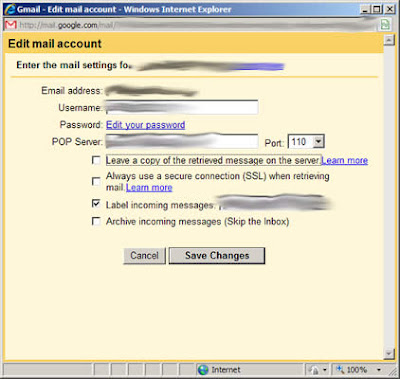
NUS Email POP3 Settings
Here is how the settings should be - Username: Your MATRIC number e.g. u0708534
- Password: Your NUSNET password
- POP Server: select 'pop.nus.edu.sg'
- Port: 110
- Leave a copy of the retrieved message on the server: UNCHECK
WARNING: Check this only if you still want the e-mail to be left on the NUS server for retrieval via NUS mail later. But note that this will take up space as time goes on and sooner or later, the god admin System Administrator will be after you with his punishment. Remember, He has the power to stop all mails to your NUS e-mail account. Otherwise uncheck it so that GMail will delete the e-mail in the NUS server after downloading them to your GMail. This will clear the precious space for new incoming e-mail and helps keep you in the System Administrator's good books. Trust me, you don't want to incur the wrath of the System Administrator. - Always use a secure connection (SSL) when retrieving mail: UNCHECK
- Label incoming messages: CHECK
- Archive incoming messages (Skip the Inbox): UNCHECK
Click Add Account.
- Once you are done, you should receive good news.
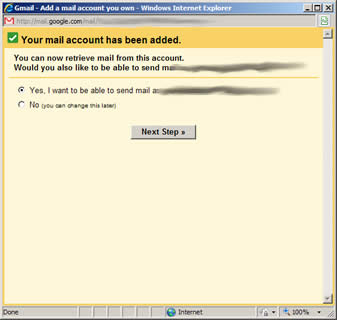
Success! No more measly limits!
-
Check 'Yes, I want to be able to send mail..' and then click Next Step - Enter your FULL NAME as in your matric card when it asks you for your name. Then click Next Step
- GMail will want to verify that you are the owner of the e-mail address. Click on Send Verification.
- Check your e-mail using NUS Web Access. Look for a e-mail with subject "Gmail Confirmation - Send Mail as XXXXX". Sometimes, it may end up in the Spam folder.
- There will be a confirmation code in the email. Copy the number and paste it into the pop-up box. Close NUS Web Mail.

Enter the code and click Verify
After clicking Verify, the pop-up will close and you are brought back to the Accounts page.
- WAIT, we're not done yet. Check 'Reply from the same address to which the message was sent' under 'When receiving a message'. This ensures that when you reply to your NUS mails, the FROM field appears as your NUS e-mail account and not your GMail account.
- Now when you go to your inbox, you will see all the messages that were in your NUS inbox.
Finally, note that you will still need to access NUS Web Mail for some mails which don't pass its lame spam filters. Unfortunately, there doesn't seem to be a way to disable the spam folder in NUS e-mail system. Just take it that it is the System Administrator's way of ensuring you come back. For now, you don't have to worry about messing with the System Administrator unknowingly...
It's been said that things that are too good to be true, are usually are. NUS Large Mail is a fine example of that. 
What it actually means. Source
When you go to the fine print of this upgrade here, it becomes clear. What is thought to be a simple 1GB upgrade of all mailboxes is actually a complicated addition of a secondary 'vault'. Something like the Closed Bidding period in CORS - where things can be quite random. Actually, it works to a extent. But only if the rate of incoming mail does not exceed the rate it archives the mail. Sure, it auto archives my mail for me every month. But if I happen to receive lots of large files in 2 consecutive days, I still have to login to clear my inbox as the archival kicks in at an unknown period of time. There's still no peace of mind. With e-mail accounts like GMail, I don't have to worry about exceeding my allocated space as the 7GBs of space is all there for me to use. However, if I could just move every single mail to that 1GB 'vault' automatically, then it would be a great! But no... 
The hidden truth about NUS LargeMail
No, you can't change the automatic archival limit to archive every single mail. You need to do this manually... and use Outlook... and install some extension software... and.. you get the idea! So what's the actual e-mail space you have? 0.03 GB. All right stop rubbing your eyes! I said it correctly, it's 30 MB. The same. At Yahoo, Hotmail and Gmail, you get over 1GB (1000MB) of space. 
At these providers, you get more than 1GB of real space! (Image stolen)
Perhaps NUS should dump Microsoft Exchange and move to Google Apps. Let Google handle all the space and maintenance. This would mean relying on a provider across the Singapore borders... but .. Oh well, let's not get too academic here. So how to resolve this for now? For those of you with GMail accounts and know how to do it, configure GMail to collect email from your NUS mail via POP3. If you are using Live! Hotmail, Yahoo! Mail or any other e-mail account, you can use NUS email redirection service - AutoForward - but it can be difficult to distinguish some NUS mails. See my other post on how to connect your GMail account to NUS's E-mail system.
So you have a job vacancy. Or a survey. Or a lab experiment. Or a seminar that needs seats filled up. What are you going to do? How are you going to get the 'manpower' to fill the slots? 
How? How? Can even Einstein figure this out? (Image Stolen)
Let's see... You are a Staff, a NUS employee. That gives you many rights. Cool! Next... you have at your disposal, access to a complete database of e-mail addresses. 100% guaranteed, verified and certified NUS [under]graduates. Where else can you get such trusted lists? It should be a no brainer. Just need to ask your superior and you'll get a immediate nod to send an e-mail to the whole list. So how does it go? Here are the steps - Step One. Compose the mail. Make it attractive. Treat it as a newsletter rather than a plain text e-mail. Put lots of colors and images.
- Step Two. Images. How can we integrate them into the e-mail?
- Put images on a NUS web server so that anyone who opens the mail downloads the images from the server. (about 33% do this)
- Just dump the images into the e-mail. Don't worry if the e-mail comes to 3MB of size (or 5MB - 'IS Department Newsletter' - where a whole 4MB of pdf was attached and sent to all SOC students), NUS students have '1GB' of e-mail space anyway... (about 33% do this)
- Be more caring and reduce the use of images to only include important ones. Throw away images that consist of only words and transcribe them in HTML. (about 33% do this)
- So there's a career opening at Ubisoft and you have 2MB of documents. Great opportunity for NUS Students! So how do you forward this mail?
- Put the documents on a NUS web server so that anyone who opens the mail can download the documents if they want.
- Just forward everything into the e-mail. Don't worry about the e-mail size, NUS students have '1GB' of e-mail space anyway...
- Now send the e-mail to ALL NUS students. If you feel nice, send specifically only to students who fit into the requirements of the event (e.g. job applications only for final year students). Otherwise, just mass send. It's NUS mail, and NUS students have '1GB' of e-mail space anyway...
- If any of the below conditions are met:
- Good relationship with the IVLE department
- Your superior is a Big Shot.
Then you are in luck. Ask to place your announcement in IVLE Important Messages:

You may be able to get a spot here if your connections are good! - About a week before the deadline, send a reminder, again to the whole NUS student mailing list, as in Step Three
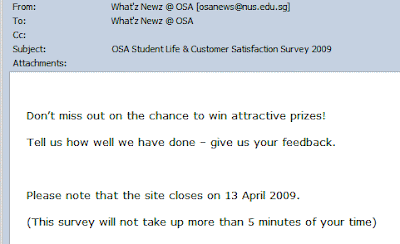
Reminder! Don't miss out! Prizes! - Don't follow a standard Opt-Out scheme such as NUS Groups. Opt-Out rather than Opt-In
Yea, we are a important organization/group that NUS students cannot opt out of! So there is no unsubscribe link at the bottom.
I'm not sure why, but I suddenly find that I am receiving NUS Museum e-mails. And the best part is, they just assumed all NUS students are die hard historians, adding all of them to the mailing list at one go.
Fortunately, there is a unsubscribe link which appears at the bottom for SOME of the mails.
And the mails are not small, with one coming up to 1.2MB. That's about 4% of my mailbox space! That's all right.. NUS students have '1GB' of e-mail space anyway...
- 'Extend' the dateline
So the response was not good? Well perhaps they forgot about it due to exams and projects. How do you send the mailer again to avoid being caught with spamming?

Extend the Closing Date! Create some event and use that opportunity to send a 'reminder' out.
- Send a Reminder Before The Closing Date

Reminder! Those who have not taken the survey! Self explanatory.
The above step by step guide is of course, all fabricated. So what's the point of all these? I tend to send big files to my friends. Powerpoint presentations, Word documents. BIG files. Although IVLE communities exist, sometimes, e-mail is just more convenient. Every KB of that 30000KB e-mail space counts. And then these mailers come in between to take up theprecious space. And then the most scary e-mail comes.. from the 'System Administrator'.. 'Your mailbox is over its size limit'! It threatens to clear now or else! And I will LOSE new incoming mails! Won't even be notified of any mail lost. Announcements, CORS, Modules, Ballot results - nothing will be received! All rejected and I will be lost wondering what important mail I have lost. Fortunately, Outlook Web Access allows sorting of mails by the amount of disk space taken, making cleaning tasks easier. 
No more space to put more mail! In actual fact, NUS students DO NOT have '1GB' of e-mail space. More on that on another post... but some of you know should know what I am talking about So to NUS Staff and Mass E-Mail senders, don't send large attachments/e-mails. If you need to, just send a summary with a LINK or join me in petitioning NUS IT to upgrade NUS Students to a real 1GB e-mail box. Then you can start sending the MBs of stuff.
Hey NUS Mates! You know those surveys that you are forced to take every semester? Yea, those student feedback surveys? Here's a letter from me with regards to that:
Dear NUS Mate,
How have you been doing? I hope you are going to graduate soon. Wish you the very best!
I have a sincere request. Please don't specify that the modules you are taking as easy during the end of semester module surveys.
You make us, future victims of the module, suffer for that click on that radio box. Because, based on your feedback, the course coordinators make the module harder. Please always say that the modules are hard. You will still earn the 'free' NUS points.
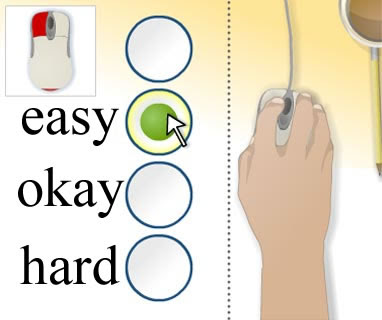
That 0.5ms time you take to click on that radio box = 1 semester of extreme torture for future students. Image stolen.
In return, we promise to mark our modules as very tough so that you will have an easier time with SSs, UEs and Breadths. Deal?
With Warm Regards,
NUS Computing Student
P.S: 'Free' NUS points for doing surveys? Right. More like bidding points being penalized if you don't participate. If you don't participate in these free point schemes, you end up lower than the competition in CORS. Clever gimmick to make students participate. P.P.S: That's not even scratching the surface 2 years ago. "Graduate students, Dentistry, Law and Medicine undergraduate students who do not participate in the feedback exercise will only be able to access their results via the internet five days after the release of the examination results". What better way to imply that you must take this survey?
NUS E-mail is being used to communicate all sorts of things that should be posted in a bulletin board / mailing list.
Recently I received the following mails: 
Racing Cars anyone? And from a source I would trust

IMPORTANT news to all SoC students!! New music library operating times! Huh?

Free advertising privilege for a NOC student?

Some 'thoughtfully' come with the <ADV> prefix and even require read receipts
Seriously! How does the hours of music library changing operating times warrant an e-mail to be sent to all SoC e-mail accounts?
An option is to block the senders. However, the senders also sometimes (About 30% of the time) send important information. Not much choice there eh, mate?
Why can't NUS have a page of mailing lists that we can select to opt in? E.g. Music Library Announcements, Engineering Faculty Activities, SoC Events, etc. There are NUS groups that you can opt out of, which only like 5% of the senders utilise.
Maybe NUS should consider linking up with GMail Custom Domains to fight email spam. Or allow us to forward all mails from our NUS account to another account, just like SoC E-mail allows.

New CORS design. With a pretty ang mo and laptop that looks as if they were digitally combined (photoshopped)
In a list of CORS gripes that keep growing, here are three new ones: a) Open Bidding Statistics Why, oh why, doesn't CORS display results of the open bidding statistics right at the Bidding Management page?
Why do I have to go through one long long document for the statistics? See my rant here.
Probable Reason: Requires additional tables and SQL queries that can slow down the system. Right. OK, I am playing cheat here as I have already mentioned this in another blog post. But this issue deserves another mention as I was getting really frustrated from scrolling up and down when looking for open bidding statistics.
b) Not checking for whether I can take a module BEFORE I add a module Minor gripe, why doesn't CORS check the eligibility BEFORE I add a module?

Right, tell me this only after I spend time adding, choosing a module and not before it
A minor usability issue. But it could have saved me 5 minutes of my NUS life! c) Current system time in the bidding page? Why isn't the current system time shown at the bidding page? Every minute/second makes a difference so the time in the system could be different from the time in my watch during the last few minutes. Especially for snipers like me <grin>.
Oh well, perhaps this is one of the ways to prevent last minute bidding and err.. 'save resources'. d) Round 3A starts during term time? Long Round 2A? Why does CORS Round 3A starting during term time?
Why does Round 2A require 3 (that's THREE) days?? Two days is reasonable, but three days just to watch the bid points go higher and higher and higher and .. you get the idea.

Round 3A starts on the Monday, the first day of lessons
And why does a module allocate slots to each faculty rather that letting the faculties compete with each other? Open field, direct competition with all NUS students. "Save resources"? Nonetheless, the new CORS design does improve things alot (the navigation is finally non-javascript based). That's only in the front unfortunately. Once you login, it is still the same old thing.
The Centralized Online Registration System, the first barrier that all NUS students have to jump over before any semester starts. 
CORS! We meet again!
It comes with two bidding periods: - The open period where you will be able to view the highest, lowest and the next minimum bid.
- The closed period where you will not be able to view any of the above except for the number of bidders. You will be able to view the status of the bids as of before the closing periods in one very long HTML table.
From the official site: 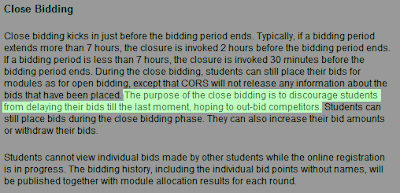
"The purpose of the close bidding is to discourage students from delaying their bids till the last moment, hoping to out-bid competitors"
So, what is stopping a student from doing these? - Place bids only during the closing period
- Place bids only during the last 5 minutes of the closing period to avoid updating the Number of Bidders
Basically, during the closing period, the bidder makes his best bid with the provided information at the end of the opening period. If all bidders follow the above 2 rules, the bidder has to make a maximum bid that he budgeted for the module. 
Imagine everyone keeps quiet until the last 5 minutes of the closed bidding period and then start submitting their bids.
I believe that the actual reason for the closing period is to prevent the system from getting overloaded during the last few minutes of a round. I have heard rumours from the seniors that the system gets very slow during the old times where there were no closing periods. And why not adopt these methods to fix the overload issue? - Convert the system to PHP - a very efficient and fast programming language as compared to the slow and bulky Java that is being used now. Or some other efficient language. Probable reason: Too much resources needed.
- Employ Grid Computing for handling server load, especially during the end times. It *looks* like the CORS system is managed on ONE server. Probable reason: Too much resources needed.
That's the main point - they want to save costs and not invest in more hardware or progamming time. They could have balanced the load between more than one server and even make attempts to optimize the code by switching over to PHP. 
Must save cost! Must solve problem! (Note: 3 images stolen from other sites)
So instead of doing the above, the CORS committee decided to save costs and switch to this luck-based closed bidding system. Ebay anyone? Yahoo Auctions? Imagine if they did like what NUS did to save costs, implement a closed bidding period for popular auctions. The 2 same exact above strategies can be used. Not to say that the CORS system sucks. It does its basic job brilliantly as long as the bidders don't exceed the number of vacancies. But this closing bidding period scheme... well, you get the idea.
The S in HTTPS stands for Secure [sockets] - an encrypted connection to the server, which means exchanging much more data than a normal HTTP connection. When used in ideal situations, the admin (or anyone else monitoring the packets from your PC) can not see what data you are sending, including form data as it is all encrypted. Even if the admin is a super administrator of the NUS network. So, having said that, WHY do these pages require (read:won't work with normal http) HTTPS connections? IVLE - Integrated Virtual Learning Environment
https://ivle.nus.edu.sg/default.asp Mail
https://exchange.nus.edu.sg/exchweb/bin/auth/owalogon.asp?url=https://exchange.nus.edu.sg/exchange&reason=0 Modules Listing
https://aces01.nus.edu.sg/cors/jsp/report/ModuleInfoListing.jsp mySOC
https://mysoc.nus.edu.sg/mysoc/index.cgi Need to know module information? Its in a HTTPS website for no particular reason! CS1110X -
https://aces01.nus.edu.sg/cors/jsp/report/ModuleDetailedInfo.jsp?acad_y=2006/2007&sem_c=1&mod_c=CS1101X Timetable Builder
https://webrb.nus.edu.sg/ctt/builder.aspx
You may argue, the authentication details need to be encrypted. The username password should be in a secure channel. Yes, I agree - but why encrypt the whole system? Why not just create a *standard* login page for the entire system in HTTPS mode and perform normal authenticated actions in HTTP mode? See Hotmail for a perfect example. Click "Sign in using enhanced security", brings you to an HTTPS page. Sign in. Notice that you're brought back to a HTTP page after successful login. 
The reason why HTTPS should not be overused is because of its higher bandwidth requirement. NUS is already slow as it is (yes, for a local site, it is very slow - try downloading Ubuntu and max speed is 10-40KB/s - US sites can go much faster than this). That brings me to another issue - NUS needs to consider a bigger pipe to the major ISPs here. Loading the homepage itself takes about 15-20 seconds with my Singnet broadband. Otherwise, preparing myself for the 8am class on Monday next week, that means I have to leave at 6-630hrs in the morning. Took a glimpse of the MA1301 exam paper, OMG it is so complicated! Take for example, this question. 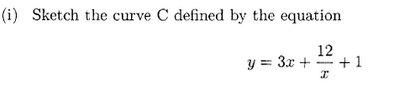
Easy, I thought. O level question. Well, read on. 
Looking forward to getting done and over with this module and the other Maths modules. God, why do we have to learn Maths. Some Interesting Links (Not NUS related) Would you dare to do your business at this toilet?
http://www.yatblog.com/2006/08/08/swiss-public-toilet/
Top Flash Games
http://www.diggpuzzles.com/ How a pregnant ladies' stomach grows everyday
Long Link Photos of lightning fast action
http://www.rit.edu/~andpph/exhibit-3.html Animated Jigsaw Puzzle
http://www.brl.ntt.co.jp/people/hara/fly.swf Watch A Live Ant Farm right front of you
http://hackedgadgets.com/2006/08/07/ant-farm/ Magic Card Trick
http://www.youtube.com/v/2KrdBUFeFtY And how it was done
http://www.instructables.com/id/EUO2ZWGMX3EQEC14US/
|


![You are expected to check your e-mail regularly [ source ]](https://blogger.googleusercontent.com/img/b/R29vZ2xl/AVvXsEj7xxWyYOJIY81rvXv0VMPdYYZQSpDwQahOKIHUuLUXfE7Yqehs7rrfkJtjgeIY99KVw7hXS1GUYI8uUOwcmaKYUtiffcJnyeQbqoMecFfCQzHoLo_lfPCURMhzTZKJIugGCqSoLQ/s1600-h/tech.jpg)


