Sunday, 12 October 2008

The NEW! CORS Gripes

New CORS design. With a pretty ang mo and laptop that looks as if they were digitally combined
New CORS design. With a pretty ang mo and laptop that looks as if they were digitally combined (photoshopped)
In a list of CORS gripes that keep growing, here are three new ones:

a) Open Bidding Statistics

Why, oh why, doesn't CORS display results of the open bidding statistics right at the Bidding Management page?

Why do I have to go through one long long document for the statistics? See my rant here.

Probable Reason: Requires additional tables and SQL queries that can slow down the system. Right.

OK, I am playing cheat here as I have already mentioned this in another blog post. But this issue deserves another mention as I was getting really frustrated from scrolling up and down when looking for open bidding statistics.

b) Not checking for whether I can take a module BEFORE I add a module

Minor gripe, why doesn't CORS check the eligibility BEFORE I add a module?

Right, tell me this only after I add a module and not before it
Right, tell me this only after I spend time adding, choosing a module and not before it
A minor usability issue. But it could have saved me 5 minutes of my NUS life!
c) Current system time in the bidding page?

Why isn't the current system time shown at the bidding page? Every minute/second makes a difference so the time in the system could be different from the time in my watch during the last few minutes.

Especially for snipers like me <grin>.

Oh well, perhaps this is one of the ways to prevent last minute bidding and err.. 'save resources'.

d) Round 3A starts during term time? Long Round 2A?
Why does CORS Round 3A starting during term time?

Why does Round 2A require 3 (that's THREE) days?? Two days is reasonable, but three days just to watch the bid points go higher and higher and higher and .. you get the idea.

Round 3A starts on the Monday, the first day of lesson
Round 3A starts on the Monday, the first day of lessons

And why does a module allocate slots to each faculty rather that letting the faculties compete with each other? Open field, direct competition with all NUS students. "Save resources"?

Nonetheless, the new CORS design does improve things alot (the navigation is finally non-javascript based). That's only in the front unfortunately. Once you login, it is still the same old thing.

Monday, 28 July 2008

Top 5 Annoying Things Lecturers Do

This is a follow up to the previous one, now that I am in third year.

  1. Not uploading PowerPoint slides in PowerPoint format

    What is with PDF that lecturers just love to post instead of the original PPT? Compatibility? Why not upload both versions? Copyright? Lecturer's lecture notes are NUS property, not personal property.

    It a war of PPT vs PDF!
    It is a war of PPT vs PDF! 4 images stolen
    Some of the lecturers go a bit further on the PDFs; they upload different versions of the PDFs. Like 4 slides per page, or 8 slides per page.

    Hello, why not save the trouble and just upload the original PPT?

    OT: Deciding whether to go for Office 2003 or Office 2007? Go for Office 2003. The interface for Office 2007 is way way different from Office 2003. What's more, there is no way to switch to the Office 2003 view.

    Word 2007 new interface - all menu options are now reshuffled around
    Word 2007 new interface - all menu options are now reshuffled around
    OT: For those new SOC computing freshies, help yourself to the latest Microsoft developer software. No Office though :(

  2. Not providing answers to exams and/or tutorials

    Common excuses:

    1. "We want you to discuss the answers".
    2. "Giving model answers may make you think that this is the strict answer"

    Translated, in my opinion

    1. "There are so many answers that we feel it would take too much of our precious time"
    2. "There are many answers for this. So we feel it is better that you write / record / memorize the words spoken / displayed during the tutorials so that each of you get your own unique idea of the answer"

    come to tutorial to find out the answer
    Get the answers during the tutorial. No written answers will be released.
    Sometimes, you wish there is a ten year series assessment books for modules like this.

  3. Not randomly assigning project groups

    Some of you may not agree with me. That's probably because you already have mates that are taking the same modules as you. However, this introduces a problem. The saying 'Birds of a feather flock together' explains the problem.

    Do you get to choose your members in the work force?
    Do you get to choose your members in the work force? Image stolen
    What I mean is that people who know each other will form up and the leftovers are left to scour for group members in the forums.

    This means spending time to post in a forum (citing marketing words like ' I cannot SU this module', 'have taken related modules before', 'cap 4.5+!!!', etc) and making guesswork of whether a topic poster has already formed their group - not many people update their thread if their group has been formed.

  4. Providing lectu__ notes with bla__ spaces

    Combine this with the PDF problem mentioned above and you either MUST print out the lecture notes, or write the answers in a separate sheet somewhere.

    In the uploaded slides, the underlined text are just underlines without text
    In the uploaded slides, the underlined texts are just underlines without text
    The aim here seems to be to improve attendance to lectures. But why??!! If students don't want to attend, then it is their problem. It is a choice they have taken to sacrifice your all important famous mythical (insert-more-words) lecture. Why do lecturers have to encourage them to come by putting 'blanks'? Besides, they can get the answers from those who attend the lecturers. And you waste time by waiting for students noting down the answers.

    Tip: Most lecturers change their lecture notes after going through a lecture so I tend to print the PPTs only before a major exam. Furthermore, you can modify the lecture notes with your own notes. Provided, the lecturer. Uploads. In. Powerpoint.

    Tip: You can print 16 slides per page using a combination of Foxit Reader and PDF Creator. They're really not that small unless the lecturer squeezes many points in one slide. In fact, sometimes I print 25 slides per page, if the slides consist of mostly few words in big font (e.g. Catherine Tay's BSP1004 slides).

  5. Marks for acting stupid, being talkative or just asking wild questions

    Translated into real world - "Class Participation". This is a great boon for those people who are not afraid of stares, making mistakes, saying stupid things and things that others may not understand. Oops, did I just admit something about myself?

    When in doubt, act stupid
    When in doubt, act stupid! Image stolen
    The act of the tutor or tutorial assistant having to write a mark every time somebody opens his/her mouth sometimes looks funny to me. People are getting rewarded for talking! Wow.

    Maybe NUS is training us to be more willing to talk. Well, I think this method only serves to reward people who are not afraid of talking and since marks are given for talking, some people may be more reluctant (rather than more eager) due to the fighting for tutor's attention and marks.

Meeting NUS CORS soon; bidding time again. And what do I see? A new CORS homepage design!

For some odd reason, the header seems to have a broken right side
For some odd reason, the header's right side seems to going to break off anytime

Good luck to all bidders. Don't forget to read through these valuable CORS tips.

Saturday, 12 January 2008

Winning in CORS. Timetable Builder. Another Semester Start Irritant

I'm through with CORS. The tactic works - Wait till 4:55pm and put in your points. Do not bid first (leave it at zero). Got all my modules with this tactic <evil laughter>. Oh no, did I just let out a tip?

How to win (in) Centralized Online Registration System - GUARANTEED!
How to win (in) Centralized Online Registration System.

And I am not alone, judging by the increasing number of bidders in the last 15 minutes. And who doesn't want to? The other bidders for the module have the following considerations

  1. They have very little time to make a decision in the last 15 minutes if the bidding gets too high

  2. They do not want to put too many points in it

  3. Many will not bother re-checking the bidders as they think the closed bidding period has not much to offer. This is GOOD in one way as there is a potential for you to increase your bid points and go over budget on seeing the number of bidders ballooning. BAD in a way that you could have used the points and module slot to bid for another module if they are too many bidders.

The fact is, the number of bidders play a BIG role. If the bidders are much more than the vacancies available, than you know you have to bid much higher due to the increased competition. Lower than vacancy, you will have to watch for Snipers (as they are known as in eBay; people who bid in the last minute).

Needless to say, the F5 (Refresh) key is still used before close bidding.
Needless to say, the F5 (Refresh) key is still used before close bidding. Image is stolen.

Next, the NUS Time Table Builder. Often linked to and praised about on how it has helped plan our semesters, this tool is indispensable.
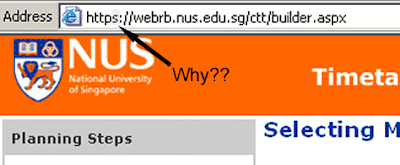
The NUS Timetable Builder

It uses HTTPS. Shh, somebody is going to find out what modules you are going to bid for. It is Top Secret! Encrypted with key length 1024-bits. Nearly undecipherable. Rest assured that nobody can break it within reasonable time.

Raaaaight. My planning of the time table is very, very confidential.
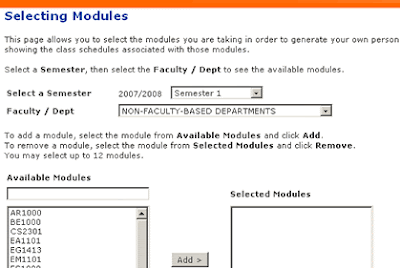
Step 1: Selecting Modules.

Now to select modules. Easy as pie. Select the faculty and add the modules as needed. There's only one problem. The correct semester. The system defaults to Semester 1 for one of the oddest reason I cannot imagine. Those who are used to planning the time tables repeatedly in semester 1 may forget to change the Semester box and end up with the wrong time tables.

That's Problem 1.

So for this semester, I plan to take CS1105 and CS1231. I also added CS1102Y and CS1102Z so that I can see how it fits into the time table and choose the best class. Hit "Next".

Oh, a exam clash. That's OK, lets ignore and move on.

Looks like an exam clash. That's fine. Clashing exams will cause problems and cannot be added to CORS either. But since I am adding both of them only for comparison's sake, I click "Next".

I *know* there's a clash. But I am OK with it!

Show stopper encountered. Problem 2.

Now I have to manually generate two time tables to compare. I uncheck the first one and click "Next".
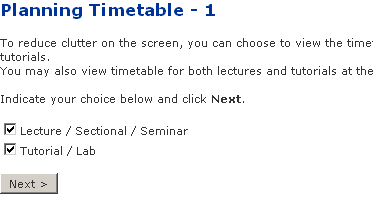
Now to select what to view.

It asks me whether I want to view only lectures and/or tutorials. I find myself always choosing both, so that I can plan tutorials as well. If many people are doing this, this screen should be skipped and provided as an option in the time table screen instead.

Hitting "Next" showed me the generated time table. You can select the slots and keep hitting "Rebuild" to show an updated time table. Pretty good. This is where you try with different slots and tutorial slots to get the sleep-and-wake-up-late and 3-off-days-per-week dreams of every NUS student.
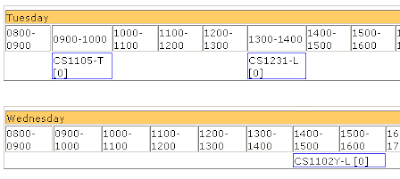
A partial screen shot of the generated timetable

Looks good, but CS1102Y seems to be alone. Oh well, lets see if I can replace it with another module. *digs through CORS listings*. *finds a module* MA1505! It is an 8am lecture module, but it'll help me normalize my waking time so that I do not end up waking up too late everyday.

Now, how do I add the module to my beautifully customized lecture and tutorial slot timetable? *looks around the page*
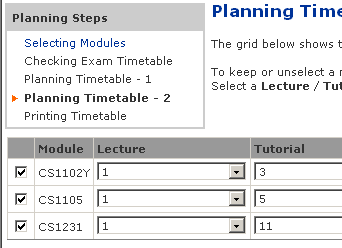
My beautifully customized time table. Now to add a module...
My beautifully customised time table. Now to add a module...

There is a blue link on the top left - "Selecting Modules". That should be it. *click*

It brings me to the first page, without any modules selected.

Click "Back". Heave a breath of relief on not losing any of the customized data. Quickly do a "Save As" in case something goes wrong.

Now I try to hit the "Back" button to the module selection screen.

It brings me to the first page again, without any modules selected.

So there are no easy ways to add or remove modules other than repeating the whole process again. Problem 3. Neither can you plan a time table with modules that have clashing exam dates.

Otherwise, it is still a very good tool. Happy New Year everybody.