|
|
(Updated 15th August 2009) Going through my analytics, people are coming to my blog with some questions not really covered in my blog. Here is a collation of the most frequently asked questions with my best answers. Again, note that this is unofficial. 
- Does NUS School of Computing (SOC) suck?
Depends on the modules you take. Some modules have lecturers who you may have trouble understanding their accent. Some lecturers like randomly picking from the audience and asking questions.
There was one module where we HAD to flood the external presenter with questions in order to get class participation marks. And it's not consistent every year so module reviews that you get from other students will be outdated as the module is changed according to the feedback or lecturers changing. Plus, tutors are mostly graduate students who sometimes may not be really interested in teaching. Many many variables here...
- So what are the easy modules for me to take in NUS?
For computing students, CS1105: Computing and Society and GEK1531: Introduction to Cybercrime are very popular. GEK1531 may not be for you if you are not into internet hacking and don't understand how the internet works. Plus, it is a high demand module in CORS for usually about 800 points from General. IT1001 is also popular for non-SOC students looking for a breadth module. High point module too.
For the rest, unfortunately, how 'easy' a module is depends on what you already know. Your friend may say it is a easy module, but that could be because he/she already has experience on it. However, don't worry. You will learn about more the choices of modules that you can take from your friends as time passes. They are the best information source as they have taken the modules recently and you get the latest information on how the module is and what it covers.
- How do I check my status of my graduation for SOC students?
Go here and you can access the File For Graduation Degree Verifier.
- Why do I have a UNIX e-mail account too?
I don't know too. Perhaps to show the geekiness of SOC students and I too find it a hassle to manage TWO e-mail accounts in SOC in addition to the primary one I already have. Three passwords to remember! Plus, the password complexity requirements for the UNIX accounts way exceed even the security of my Blogger account.
Fortunately, you can forward all e-mails sent to the SOC UNIX account to your main account here and forget about this stupid UNIX email account. Heck, you can even forward your NUS account to your GMail account or setup auto forwarding in your NUSNet account.
- How do I login to mySOC?
Go here. Use your matric number (e.g. U0910121) and password. No need to specify the NUSSTU domain.
- Where can I get the list of modules being taught in SOC?
Right here.
- Is it true that SOC students have a free grayscale laser printing quota?
Yes, you have about 50 grayscale pages of quota. If you print double sided (i.e. not use the -sx suffixed printers), you can print 1.5 times more!
Unfortunately, I can't find any online Windows guides to adding the printers for connecting your laptop. Suffice to say that you need to be on SOC's VPN network (or NUS wireless network) and must already have a UNIX account. Then go to Control Panel > Printers > Add Printer > Network Printer > enter '\\nts27\' under 'connect to this printer (or browse for a...' > next > select the printer to print to. If you are still having trouble, bring your laptop to your Technical Support Desk located in SOC near the main entrance.
Note that you don't need to connect to printers manually if you are using SOC lab computers. But you will still be using your assigned quota when printing from workstations. Your UNIX id is automatically detected when you login with your NUSNET username to these workstations.
Print test prints with single pages before printing away the whole lecture slides. You will notice the first page is always your UNIX id in big letters so as to separate print jobs of other users. Get comfortable with how the printing works before sending bigger jobs to the printers as you don't much quota to play with. Yes, paper is included in the quota. Yes, you can buy more quota via mySOC (or direct link). Printer names with a SX suffix means they will only print single side. Printers with DX suffix means they will print double side.
By the way, the 500+ line printing quota you get is for the noisy printer near the technical support office and used to print only text files. I heard it is mainly used to print source code out. The paper is also not standard 80gsm paper.
- How do I check my SOC remaining print quota?
Go here.
- How do I apply for a NUS SOC UNIX account?
Go here. Be prepared to meet a ridiculous .. nah .. impossible ..nah .. ridiculously impossible password complexity requirement to create your UNIX account.
- I forgot my UNIX / mySOC password! How do I reset it?
Go here.If you need to login, use your NUSNET credentials i.e. u0910232 / password. You will need your matric card.
Any corrections let me know in the comments below.
(Updated 4th January 2010) Going through my analytics, people are coming to my blog with some questions not really covered in my blog. Here is a collation of the most frequently asked questions with my best answers. Again, note that this is unofficial.  - Can I convert my breadth module to an Unrestricted Elective?
Ask the person in charge of the module. In some cases it may be possible.
- Where can I download the latest street map / road map / shuttle bus routes of the NUS campus?
Go here
- Where is the bookshop in NUS?
It is called CO-OP. Here are the locations in NUS. But try the Clementi Book Store instead for possibly lower prices. See my other post. The prices for many textbooks at Clementi Book Store are cheaper than NUS Co-op outlets even after their discounts.
And no, you can't check CO-OP textbook prices online - you have to go there manually to check prices. There is a queue line at the inside-back-right of the store specifically to buy course textbooks. You may also want to try buying 2nd hand used textbooks in IVLE.
- When does the NUS school term start?
See the updated and future calendar term PDF calendars here
- Do NUS lectures take attendance?
No unless specifically stated by the module.
- Can I attend other lectures which I am not allocated?
By right, you are not allowed to attend other lectures, but by left, no one cares. Just be sure to have your matric card in case of security screenings (which I never encountered).
- Can I download my previous year results in a single PDF file?
You can download your past exam results transcript in one document via MyISIS. Login, click Self-Help, Academic Records, View Unofficial Transcript.
- How do I configure my laptop to connect to the encrypted NUS wireless network?
Go here and see under NUS PEAP Configuration Wireless. If it prompts for your username, enter nusstu\<your matric> for username (e.g. 'nusstu\u0910343), and your NUSNET password. Avoid using the NUSOPEN wireless network unless you are using encrypted or HTTPS encrypted websites.
Using NUSOPEN means anyone can snoop on the data you are sending and receiving with a laptop and some specialized software. For example, logging into hardwarezone with NUSOpen means anyone can get your username and password if he/she has the right software.
- How do I check my NUS email?
Via NUS Web mail. Or you can use configure Microsoft Outlook 2007, Outlook Express, IMAP or any other POP3 compatible mail client to access your NUS EMail. When logging in via NUS Web mail, enter nusstu\<your matric> for username, and your NUSNET password. For quick reference, here are the mail settings: Incoming mail (POP3) server: pop.nus.edu.sg
Outgoing mail (SMTP) server: smtp.nus.edu.sg
Mail server user name: your Exchange user name (e.g. u0910121)
Outgoing mail server user name: your Exchange user name
Incoming mail (IMAP4) server: imap.nus.edu.sg
- How do I interpret the NUS module codes?
Generally, the first two alphabets refer to the department handling the module. Some modules like Singapore Studies and GEMs follow the SS and GEK prefix.
Next, the first digit indicates the level of difficulty. Personally, I think the difference between the level 1 and 2 modules in SOC is negligible. For freshies, you can only take a total of 60MCs worth of level 1 modules.
It is said that the second digit indicates the difficulty of the module. Perhaps, but if you compare MA1301 and MA1101R, does it sound easier?
- What are the NUS tuition fees?
Download the PDF here and SAVE it. If you are not in the current new cohort, your fees may be lower (if it prompts for your username, enter nusstu\<your matric> for username, and your NUSNET password)
- Can I forward my NUS mails?
No, but you can use GMail to retrieve it for you. See my post for a guide on this. UPDATE: Thanks to Frank in the comments, NUS mail forwarding can be done automatically! Seems to have been there all the time and I somehow missed it :/ You may still want to check out my GMail guide if you want labeling with your NUSNet mails.
- How much is the NUS hostel bills?
See here. Remember, CCA points also play a role in getting the room you want. See here for 2009/2010.
- What are the figures for the number of students enrolled in NUS this year?
Go here
- What are CCA points used for?
Only used when you are staying on campus. You get CCA points for volunteering (read: working for free) for various activities in NUS such as Freshman Orientation or tending to stores or in the various CCA groups in NUS.
- Must I attend the Freshmen Orientation Week?
No, attendance is not compulsory. Here is my review of it here. You may want to attend just for the first few days just to know some seniors and ask questions. Or find a buddy to take modules together.
- Where can I get the list of contact details for the lecturers / professors in NUS?
Right here. Suffix @nus.edu.sg to the user id to get the full e-mail address
- Where are the study areas in NUS?
Almost everywhere there will be benches for you. In SOC, you enjoy air-conditioned study areas as well but the space can be limited. Libraries can be used as well to study. During exam periods, expect libraries to be full.
- Can poly students take modules which they are already exempted from?
Not sure about this.
- How is the module CAP point computed?
See here
- Is there a way to calculate the CAP with my future possible grades?
Use CAP Calculator. Be warned - use a fake name and matric or else others can view your results! The fake name and matric are only used to save your results for later retrieval.
- I need a NUS logo to 'slap' on my report cover page?
Download the PDF here, zoom in to required size, and screen capture the size you want.
- Where can I photocopy, print and bind in NUS or Clementi?
Printing in NUS libraries are not free unless you are a SOC student. SOC students have free print quota that can be used to print only within the SOC faculty.
That said, Central Library allows you to print your lecture notes (note: you don't need to print lecture notes for lectures unless specifically mandated by the lecturer) and project reports with a really 'highly advanced' system that only accepts CashCard (sigh). There's also a book-copy center .. err.. I mean photocopy and binding room in the Central library when you can photocopy and pay with CashCard and ezLink (for photocopying only). Rates are 4.5 cents per page for printing and 3 cents for photocopying (source).
You can also photocopy and bind at CO-OP outlets with cash / NETS payments.
Other NUS libraries may also have facilities to allow you to print/bind, but I have not tried them personally. All libraries have self-service photocopy machines requiring payment using CashCards.
After the closing hours of about 5pm and 6pm, you can go to a shop in Clementi interchange where they are open till 9pm. Expect to pay more though.
Here are their details:
Double One Colour Centre (Kodak Express Network)
Blk 445 #01-153 Clementi Ave 3
Singapore 120445
Tel: 6778 1035 / 98286733 (don't know whether they answer SMS as it is senior folk there) They are the few ones (or only one?) in Clementi interchange area to provide binding services.
- Where can I download the Shuttle Bus routes?
Right here. Unfortunately, they have still yet omitted to include markings of the actual bus stops and only show the routes taken by the bus in the campus maps. For example, Service D skips one bus stop near the sports hall.
Here's a post about them. It's better you download the campus map and guess the bus route from there.
- Do all NUS modules have exams?
Most modules in NUS have exams, but a small percentage do not have exams. Those without exams are indicated in the CORS module information listing under 'Module Examinable' when you see the module code. Note that even though they are non-examinable, they may still hold their own 'exams' in the form of quizzes and mid term papers. And expect projects too. For example, GEK1531 is a non-examinable module but it still comes with 2 tests.
- Are there modules in NUS which allow students to bring in text books during exams?
There's open book exams in NUS which is listed under 'Open Book Exam' in the same listing. Note that even if a module is listed as '-' (not open book), you may still be allowed to bring in 'cheat sheets' of limited quantity (usually 1 A4 double sided hand written, probably cause people use tinny tiny fonts to squeeze as much as possible).
- How do I reset / change my NUSNet account and NUSNet email password?
Go here. You can also change to a nicer looking e-mail (u0910323@nus.edu.sg vs bertsimpson@nus.edu.sg) using NUS Friendly Mail. If it prompts for your username, enter nusstu\<your matric> for username, and your NUSNET password.
- What are the current offers for NUS student laptops / notebooks?
Go here. Only laptops which have been selected by NUS are offered but they come with several student software goodies such as the latest Microsoft Windows, Microsoft Office and Adobe software. No, COOP does not sell laptops. No, you cannot buy 2 laptops, only one per every 18 months. See here for more info.
- How do I join NUS mailing lists?
You don't. You are forced to receive many advertising and marketing emails. But a few generous hearts have come together and developed NUS Groups which allows you to opt out of a small percentage of those emails.
- How much email space quota am I allocated in my NUS Microsoft Exchange email account?
Your NUS mailbox size is.. 30 GB .. oops.. sorry just woke up from a dream.. it is 30MB. The information here is false and misleading! See my post for more information. You can check how much email space you have used and left here. (login as nusstu/<nusnet id >, nusnet password) See the primary storage? That is your actual mailbox size.
- Where can I get my NUS timetable with my allocated modules?
In CORS, there is a link to the 'Time Table' on the left menu (You can still login to CORS when the rounds are over). It will show allocated modules and tutorial time slots. Another alternative is to login to IVLE and click on 'My Organizer' on the left column but note that this does not show the tutorial slots assigned to you.
- Any tips for planning my timetable?
Avoid having lunch at 12-1pm as the canteens are crowded - so try to have lessons to fill in that time. Between each event, check the location of the event against the NUS campus map. If the locations require shuttle bus travel, consider putting a 1 hour break there for you to travel as the 45th min to the 15th minute are peak shuttle bus hours (e.g. 1445hrs to 1515 hours).
Finally, some people may want to space out their exam dates rather than having all exams in consecutive days/time. Note that you have a one week study break before the exams, but some modules require projects to be submitted during this break time.
- Are there tutorials in the first two weeks?
Not for most modules. However, if your module is based on 'Sectional Teaching', you have to attend as normal.
- I got a module but how do I know which lecture group I am in?
Login to CORS, go to Module Management and you can see the time slot you have been allocated under the Class column. Or you can see the 'Time Table' on the left menu in CORS. It will show allocated modules and tutorial time slots. Or login to IVLE and click on 'My Organizer' on the left column but note that this does not show the tutorial slots assigned to you.
- What is the maximum attachment size in NUS mail?
Unsure about this, but I would wager that it is about 10MB.
- How do I mass delete multiple emails when using Outlook Web Access?
Ctrl+click to multi select items. Shift+click to multi select a range of items. You may want to sort by Size first by clicking on the Size column header, then going back to Page 1.
- How do I access the previous years archive of exam papers for a NUS module?
Go here. After login, click 'Examination Papers Database'. Then enter the full module code in the first box and hit Enter. Some limitations: Certain departments do not release the papers. Some exam papers which come with MCQs are not released but the non-MCQ sections of the exam paper are released.
And oh, the site requires that you DON'T use the Back button in the browser. Instead you use the back button provided in the web page itself or it won't work correctly. Kind of like the search system in the National Library during the old days.
- Where do I get my NUSNET userid and password?
It will be given to you when you register at the matriculation fair. Along with many goodies. Don't lose it. If you don't have it, it is your matric number with an additional zero. So if your matric number is U082112Z, then your NUSNET userid will be u0802112. See the pattern?
If you have forgotten the password, then you will have to go through a password reset procedure - 'Bring along your matriculation/student card to Computer Center Level 1 to request for password reset. You may also send us a scanned copy of your Matric Card and NRIC through fax at 68725231 or email at ccehelp@nus.edu.sg .' [ source ]
Any corrections let me know in the comments below.
Have you ever noticed - the chairs in some lecture rooms are so uncomfortable to lean back on?
For example, the chairs in LT8. Try leaning back, and you find that your bottom goes forward and you lean back too much. And the chairs are actually designed to be like that.

Uncomfortable Lecture Theatre Chairs - 3 images stolen
The best comfortable one I've been to in SOC is LT27. Congratulations LT27! You win the Most Comfortable Lecture Theatre in SoC award. The worse one, LT33 / LT34. Booooo. Even the ones in Business and Arts faculty have this issue. I wonder why... Maybe it is just me :-/
Go to the study area in SOC. Find a nice study table with a innocent looking chair. Sit down.
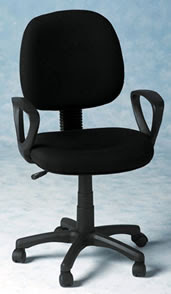
A Computer Chair - image stolen Count your lucky stars if you get a chair that doesn't have any one of these problems: - Automatic height adjustment feature. Seat goes down when you sit down, lifts up when you get up.
- Gas lift doesn't work and hence you find yourself the shortest kid in the area unable to raise the chair.
- Leaning back suddenly gets the whole area's people to look at you - the back of the chair creaks loudly
- Leaning back is impossible without you toppling over as the back of the chair leans too much.
- The back of the chair is set to the bottom at the lowest possible giving only lower back support
Regardless, I am thankful for the study areas that NUS SoC is providing as compared to other faculties. When you go to a lab to use the computer...

Check out the ergonomics! The monitor is now higher than you. And you can't lower it. The best you can do is to tilt it downwards.
You still have to tilt up your head to view the top part of the screen. And the chair syndrome also exists there. In the PCs, ClearType is disabled and the Appearance display tab in Display Settings is removed. Probably to stop me from changing the wallpaper. Changing the wallpaper only affects my user account so I can't figure out why NUS has such a policy. And don't get me started on the numerous dialog boxes that you have to close and click OK whenever you login. Up to THREE 'Message of the Day (MOTD)' and there's even one in the webpage that opens up. That's not all... 
Mouse Shit? Eewww I have seen worse than this, this is just one of the moderate cases. And finally... 
Broken Keyboard Stand - Better Ergonomics?
Sometimes you have to wonder, how did that person break it? I'll leave it to your imagination...
This is a follow up to the previous one, now that I am in third year. - Not uploading PowerPoint slides in PowerPoint format
What is with PDF that lecturers just love to post instead of the original PPT? Compatibility? Why not upload both versions? Copyright? Lecturer's lecture notes are NUS property, not personal property.

It is a war of PPT vs PDF! 4 images stolen Some of the lecturers go a bit further on the PDFs; they upload different versions of the PDFs. Like 4 slides per page, or 8 slides per page.
Hello, why not save the trouble and just upload the original PPT?
OT: Deciding whether to go for Office 2003 or Office 2007? Go for Office 2003. The interface for Office 2007 is way way different from Office 2003. What's more, there is no way to switch to the Office 2003 view.
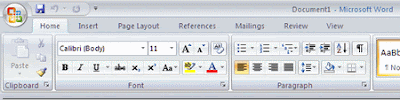
Word 2007 new interface - all menu options are now reshuffled around OT: For those new SOC computing freshies, help yourself to the latest Microsoft developer software. No Office though :(
- Not providing answers to exams and/or tutorials
Common excuses:
- "We want you to discuss the answers".
- "Giving model answers may make you think that this is the strict answer"
Translated, in my opinion
- "There are so many answers that we feel it would take too much of our precious time"
- "There are many answers for this. So we feel it is better that you write / record / memorize the words spoken / displayed during the tutorials so that each of you get your own unique idea of the answer"

Get the answers during the tutorial. No written answers will be released. Sometimes, you wish there is a ten year series assessment books for modules like this.
- Not randomly assigning project groups
Some of you may not agree with me. That's probably because you already have mates that are taking the same modules as you. However, this introduces a problem. The saying 'Birds of a feather flock together' explains the problem.

Do you get to choose your members in the work force? Image stolen What I mean is that people who know each other will form up and the leftovers are left to scour for group members in the forums.
This means spending time to post in a forum (citing marketing words like ' I cannot SU this module', 'have taken related modules before', 'cap 4.5+!!!', etc) and making guesswork of whether a topic poster has already formed their group - not many people update their thread if their group has been formed.
- Providing lectu__ notes with bla__ spaces
Combine this with the PDF problem mentioned above and you either MUST print out the lecture notes, or write the answers in a separate sheet somewhere.

In the uploaded slides, the underlined texts are just underlines without text The aim here seems to be to improve attendance to lectures. But why??!! If students don't want to attend, then it is their problem. It is a choice they have taken to sacrifice your all important famous mythical (insert-more-words) lecture. Why do lecturers have to encourage them to come by putting 'blanks'? Besides, they can get the answers from those who attend the lecturers. And you waste time by waiting for students noting down the answers.
Tip: Most lecturers change their lecture notes after going through a lecture so I tend to print the PPTs only before a major exam. Furthermore, you can modify the lecture notes with your own notes. Provided, the lecturer. Uploads. In. Powerpoint.
Tip: You can print 16 slides per page using a combination of Foxit Reader and PDF Creator. They're really not that small unless the lecturer squeezes many points in one slide. In fact, sometimes I print 25 slides per page, if the slides consist of mostly few words in big font (e.g. Catherine Tay's BSP1004 slides).
- Marks for acting stupid, being talkative or just asking wild questions
Translated into real world - "Class Participation". This is a great boon for those people who are not afraid of stares, making mistakes, saying stupid things and things that others may not understand. Oops, did I just admit something about myself?

When in doubt, act stupid! Image stolen The act of the tutor or tutorial assistant having to write a mark every time somebody opens his/her mouth sometimes looks funny to me. People are getting rewarded for talking! Wow.
Maybe NUS is training us to be more willing to talk. Well, I think this method only serves to reward people who are not afraid of talking and since marks are given for talking, some people may be more reluctant (rather than more eager) due to the fighting for tutor's attention and marks. Meeting NUS CORS soon; bidding time again. And what do I see? A new CORS homepage design! 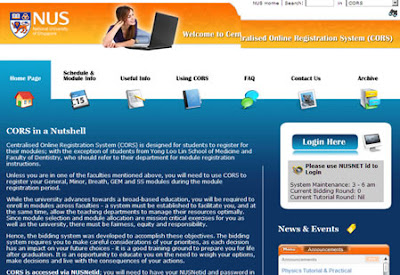
For some odd reason, the header's right side seems to going to break off anytime
Good luck to all bidders. Don't forget to read through these valuable CORS tips.
Due to the mid terms, I did not have time to add entries to the blog. Final exams are about a month away so updates may not be as frequent. - Take Care of your Belongings!!
 To risk or not to risk
Every once and then, I see students leaving their laptops on the benches for a quick toilet break. Or to buy a meal at the canteen. Even at places with very few people.
Don't. Shut the lid, put the laptop in your bag and bring it along with you. The value of that 5 minutes could be worth $2,500 if something bad happens.
Squeeze in EFFICIENTLY in Service Bus 95 (and perhaps other buses) during peak hours 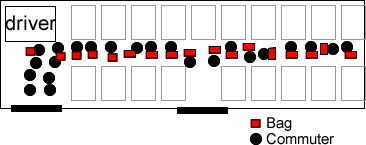 Most of the time, this is how a full bus looks like from the top (common in Service 95)
The PPF of efficient bus squeezing:
Part with your boyfriend / girlfriend / friend / mother / father / brother / sister / etc temporarily.
Put your bags in front of you or carry it in front of you.
Form two rows, that's two rows from the back to the front
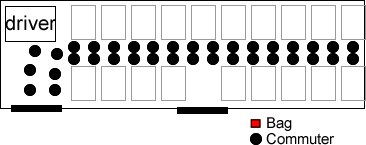 Now with this layout, more people can board the bus (the bags are placed between your legs or hand carried)
This ONLY applies to SBS buses entering NUS. Commuters taking internal shuttle buses should NOT follow the two-row rule as it will not allow greater maneuverability within the bus.
Of course, those alighting at NUH (with Service 95) will be having trouble especially if he/she is stuck in the end. My advise is to try to stand near the exits for those getting off at NUH.
Or try alternative buses - there is a bus stop near the expressway outside NUH: 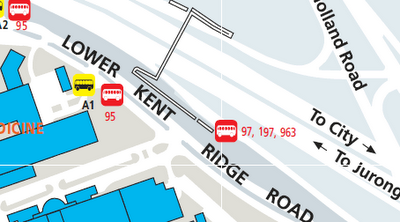 Try Service 97, 197 or 963 to NUH instead of Service 95 to avoid the crowds
- Don't eat or drink during Lectures
 The sign is there for decoration purpose?
All lecture theatres prohibit eating or drinking. Plain water drinking is allowed.
But when someone brings in a hamburger, a cup of ice milo and sits in front of me, I tend to get very distracted. The smell itself makes the stomach growl especially when you are hungry.
Imagine those having the Ramadan fasting period...
- Don't discuss or chat during Lectures
 Talk only when needed. There are benches outside for your convenience.
Another distracting element. People behind you talking something else when the lecture is about Java Programming.
If you need to talk, I am sure you can not do two things at once. Please go outside and talk or wait till the break.
- Use deodorants
 Deodorants mask/prevent the bad smell when you sweat
In a crowded area such as the bus and the distance between other commuters is very little, the last thing we want is the nasty smell from your arm pit.
- Form holes in Queues for easier and faster exits
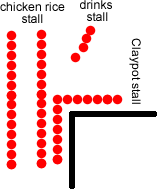 Exiting from drinks stall and claypot stall means cutting at least 2 queues
After buying a meal from a stall, I have to find a way to cut through the queues to get to my seat. Most of the time it goes okay, but sometimes people have to move back 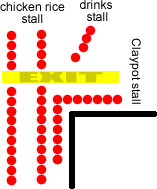 Now, with holes, people can exit faster.
- Common Courtesy
Don't step on the lecture chairs to get to a particular seat. Don't play games during lecture - its distracting - play it at the back of the lecture room.
Don't put your feet on the seat in front of you to make yourself comfortable.
- Test audio levels with the people at the back!
Please ask the guy at the back whether you are audible or not. Sometimes, you are too soft, sometimes you are too loud.
- Play Videos In Full Screen!
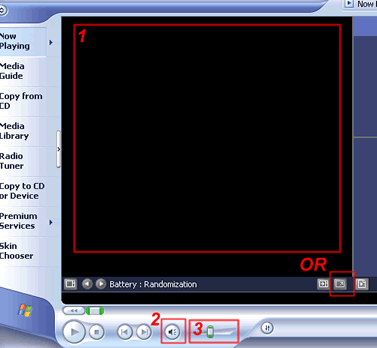
It's very kind of you to show us videos during lectures. Especially funny ones. But please, make it viewable! Full screen! Take away the top and bottom controls. Brighten up if necessary!
HOW: Double Click in (1) to launch the video in full screen. Or click the button (indicated above) to launch Full Screen. Check audio levels if needed in (2) and (3).
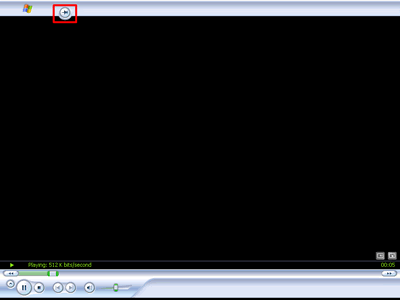
REMOVE THE TOP and BOTTOM bars: Click the red highlighted box below, make sure it is not "thumb-nailed".
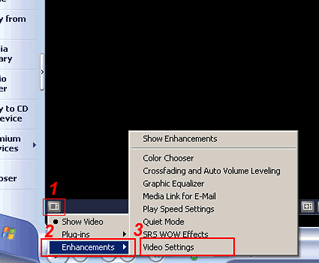
Make the video brighter if needed: Below I highlight how to open up the video controls. Adjust controls when the video is playing to notice the effect instanteously.
And remember to test whether the guy at the back of the lecturer can hear the video!
- Put Lecture Notes Online!

Some lecturers refuse to put their lecture notes online, citing reasons such as "We want you to take notes!", "We believe taking down notes makes you learn better!" and "We want you to pay more attention in class!".
Effectively, what happens is that I end up scribbling down most of the text in every slide and not listening. And when the lecturer moves on to the next slide while copying, I do a silent you-know-what in my mind.
- Don't put assignments, lecture notes and tutorials in PDF!

Please avoid PDF. Its bulky, requires a separate app, and most importantly, prevents us from making changes to the document. Say I want to add our answers to the tutorial questions - I can't. Or use PowerPoint's Notes feature to make notes, search or print in a custom layout using PowerPoint options (eg. 6 slides per page).
Yes, I know the Acrobat PDF Maker converts links and text nicely into selectable text, but what is wrong with the PPT format? Why convert it to PDF in the first place?
- Release CourseMarker Test Data!
Its disappointing when I don't get "Awesomely Good" for a lab test. I run the code again, look for loop holes and submit it again - only to get the same result back.
I am swearing here that it runs the provided test case 100% correct - but I can't figure out why it fails the other test data. With no access to the actual test data in the system, I have to personally figure out what it could have been.
After the lab is over, the test data could be released, but no. Show's over. Next Lab. No lesson learnt on why we did not get full marks for that lab.
|


 To risk or not to risk
 Most of the time, this is how a full bus looks like from the top (common in Service 95)
The PPF of efficient bus squeezing:
 Now with this layout, more people can board the bus (the bags are placed between your legs or hand carried)
This ONLY applies to SBS buses entering NUS. Commuters taking internal shuttle buses should NOT follow the two-row rule as it will not allow greater maneuverability within the bus.
Of course, those alighting at NUH (with Service 95) will be having trouble especially if he/she is stuck in the end. My advise is to try to stand near the exits for those getting off at NUH.
Or try alternative buses - there is a bus stop near the expressway outside NUH:
 Try Service 97, 197 or 963 to NUH instead of Service 95 to avoid the crowds
 The sign is there for decoration purpose?
All lecture theatres prohibit eating or drinking. Plain water drinking is allowed.
But when someone brings in a hamburger, a cup of ice milo and sits in front of me, I tend to get very distracted. The smell itself makes the stomach growl especially when you are hungry.
Imagine those having the Ramadan fasting period...
 Talk only when needed. There are benches outside for your convenience.
Another distracting element. People behind you talking something else when the lecture is about Java Programming.
If you need to talk, I am sure you can not do two things at once. Please go outside and talk or wait till the break.
 Deodorants mask/prevent the bad smell when you sweat
In a crowded area such as the bus and the distance between other commuters is very little, the last thing we want is the nasty smell from your arm pit.
 Exiting from drinks stall and claypot stall means cutting at least 2 queues
After buying a meal from a stall, I have to find a way to cut through the queues to get to my seat. Most of the time it goes okay, but sometimes people have to move back
 Now, with holes, people can exit faster.
